


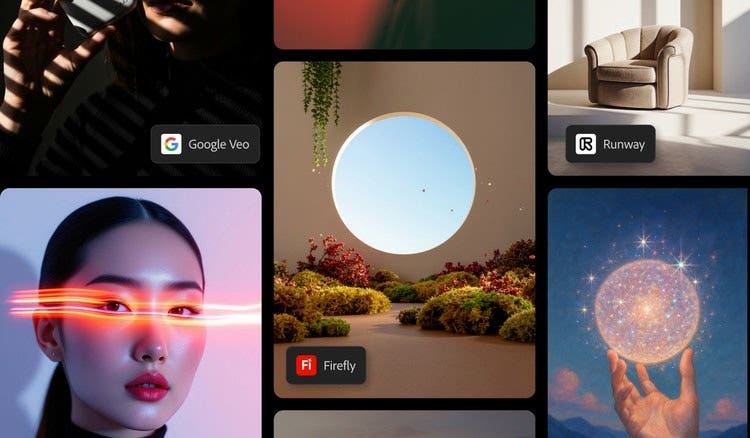

Today, Firefly is evolving even further to go beyond its original models and include a diverse range of partner models: trusted integrations with leading AI innovators like Google, OpenAI, Runway, Black Forest Labs, Topaz Labs, and more. This new multi-model ecosystem represents an innovation in providing creators with greater flexibility to select the ideal AI engine for every stage of their creative process, all within a single space.
What does this mean exactly? It means you can explore new AI models and creative possibilities while maintaining confidence that all the work remains safe, protected, and ready for real-world use.
What are partner models in Adobe Firefly?
In Adobe Firefly, partner models refer to third-party AI models that integrate directly within Firefly and the broader Creative Cloud suite. Each partner model brings a unique strength: from hyper-realistic image generation to cinematic video synthesis and everything in between.
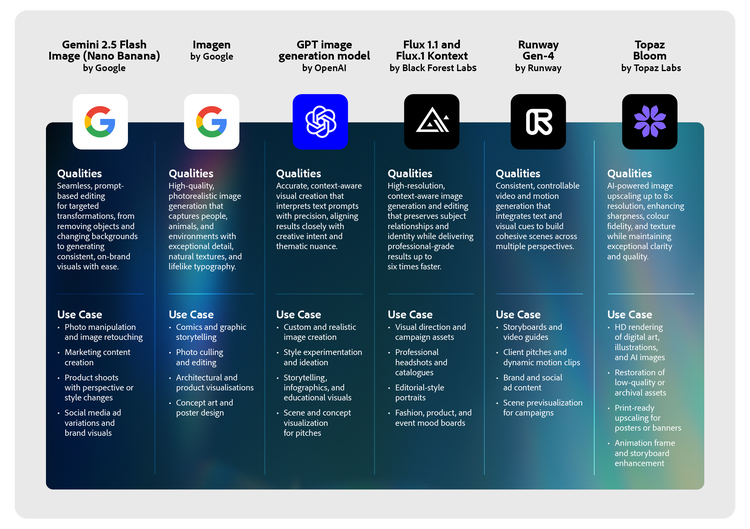
Over 10 partner models are currently supported, from leading AI models such as Google Gemini (Nano Banana), OpenAI GPT Image, Runaway Gen-4, Black Forest Labs Flux 1.1 and Topaz Bloom.
Adobe’s goal is simple: to build an open yet trusted ecosystem that creatives can leverage for smarter, faster, and smoother workflows. Rather than switching back and forth between different apps and platforms, users can stay within Firefly and still have access to some of today’s leaders in AI. Whether you’re testing a campaign concept, creating a visual storyboard, or enhancing motion design, you can rely on Firefly to have the right partner model that fits your vision best.
Jamie de Guerre, Senior Director of Product Management at Google Cloud AI, puts it this way, “Essentially, you take these amazing creative professionals that have been doing such incredible work already, and now you give them new tools that enable them even more. I can’t wait to see what everyone creates.”
The core Firefly models: A foundation for safe, high-fidelity generation.
At the centre of this multi-model expansion is Adobe’s most advanced image generation and editing model yet: Firefly Image Model 5.
With prompt-based editing, users can direct Firefly to make specific changes while keeping every untouched pixel intact. This covers adjusting lighting, swapping backgrounds, refining details, and more. Its new layer-aware generation also lets you resize, rotate, and restyle individual elements without disrupting overall composition.
Like all Firefly models, Image Model 5 is responsibly trained and commercially safe to make sure that every output is suitable for professional and business use. It is ideal for:
- High-end brand campaigns and visual production assets
- Product and lifestyle imagery for e-commerce or marketing
- Portraits, cinematic compositions, and concept photography
- Rapid visual prototyping and creative testing
- Editable, layer-based image creation for design workflows
What AI models are available on Adobe Firefly?
Adobe’s multi-model approach introduces a growing list of partner models that complement Firefly’s capabilities. Each is selected to serve specific creative goals of a growing audience that is expanding AI in their workflows. Below are just some of the AI models currently available in Firefly. It's only a glimpse into a broader ecosystem that continues to expand as Adobe brings more trusted AI models into the platform. Here’s an overview of what these models offer and what you can do with them:
How partner models enhance creative workflows.
Modern creative teams often juggle multiple tools, formats, and deadlines. Firefly’s partner model ecosystem eliminates friction by letting you move effortlessly between AI tools and Adobe’s creative apps.
For instance, you can start with a mood board directly in Adobe Firefly and then generate images within the same environment. You can choose Nano Banana for vibrant landscapes, FLUX 1.1 for artistic visuals, or Imagen for graphics with text. You can then shift to Photoshop to refine your outputs or enhance existing brand assets with Topaz Bloom before presenting to clients.
This interoperability transforms Firefly from a single AI generator into a complete creative command centre where each partner model becomes a creative collaborator: offering speed, precision, or artistry, depending on what the project demands.
Here is a sample use case that shows how different models can be combined within Adobe Firefly to generate, refine, and achieve visually stunning results.
Use case: Creating a cinematic ad campaign video for a sneaker brand.
Steps 1: Generate the hero product image using Google Imagen.
Prompt used: “A close-up cinematic shot of futuristic running shoes splashing through rain puddles on a neon city street at night, ultra-realistic lighting.”
Output:

Steps 2: Animate the shot into motion using Google Veo.
Prompt used: “Transform this still image into a slow-motion tracking shot of the shoes sprinting through rain with droplets splashing in cinematic lighting.”
Output:
Steps 3: Add sound using Firefly’s Generate soundtrack (beta).
Prompt used: “A dynamic, energetic song, with synthwave electronic style, for action visual effects.”
Output:
How does Adobe ensure creative integrity across all models?
Adobe applies the same rigorous review and ethical criteria to partner models as it does to its native ones. Each model must align with Adobe’s AI Ethics Framework, emphasising responsibility, transparency, and accountability in how the model is developed, deployed, and used. That means:
- No training on user content. Adobe and its partners do not train models on personal, uploaded, or generated files.
- Commercial-use ready outputs. Assets created within Firefly and its partner integrations can be used confidently for business or marketing.
- Content credentials for transparency. Every output includes an industry-standard metadata type that includes creator details and how the content was made (captured by camera, generated by AI, or edited using tools like Photoshop).
By combining creative freedom with enterprise-grade trust, Adobe Firefly stands out as one of the few AI platforms where creators retain ownership, control, and confidence in every project.
Frequently asked questions.
You may also like




