

16 Outstanding YouTube banner ideas.
Explore a selection of handpicked YouTube banner designs to get inspiration for building your very own.
1. Showcase your brand’s identity with a tagline or slogan.
Your banner is prime real estate for branding elements that define your channel.
Consider:
- Adding a memorable tagline that encapsulates your content.
- Using bold typography to make your message stand out.
- Keeping the text concise, clear, and aligned with your brand’s personality.
A well-crafted tagline helps reinforce your channel’s identity at a glance.
2. Utilize your banner for timely updates.
Turn your banner into a dynamic space that reflects what’s happening on your channel.
Ways to use it effectively:
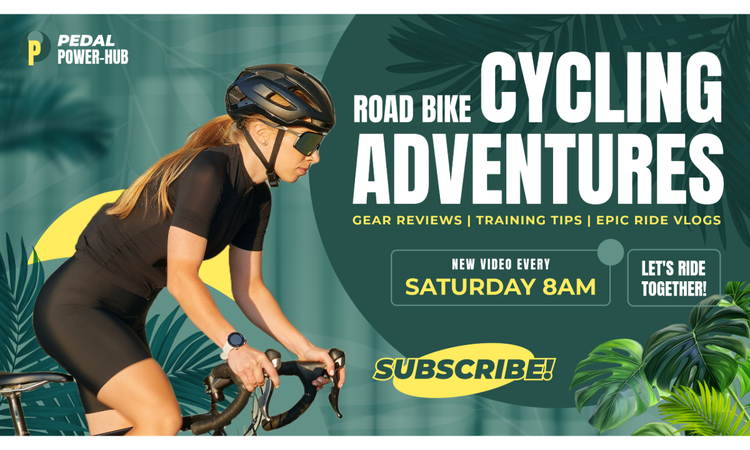
- Announce new content releases or a publishing schedule.
- Highlight seasonal themes (holidays, milestones, or special events).
- Let viewers know if you're taking a break and when you’ll be back.
This keeps your banner fresh and relevant, encouraging repeat visits.
3. Use shapes and colors for a dynamic visual impact.
Creative shapes, color schemes, and placements can elevate your design.
- Abstract or geometric shapes add structure and movement.
- Vibrant colors can create a high-energy, engaging feel.
- Subtle gradients and overlays can give a modern, polished look.
Experiment with layering techniques to make your banner visually compelling.
4. Feature a call to action (CTA).
Encourage visitors to engage with your channel by incorporating a CTA in your banner.
Some effective CTAs include:
- “Subscribe for new videos every week!”
- “Follow us on Instagram for behind-the-scenes content.”
- “Join our community – Click the link below!”
Keep it short and clear so viewers instantly understand what action to take.
5. Experiment with unique text styles.
Typography isn’t just about readability—it’s a design element that can enhance your banner’s appeal.
Creative ways to format text:
- Spacing out letters for a minimalist, sophisticated look.
- Stacking words or changing text angles for an artistic effect.
- Using color gradients to give text depth and style.
Typography can reinforce the tone and mood of your content.
6. Incorporate symbols and special characters in design.
Characters like brackets, slashes, or dashes can be used as design elements.
For example:
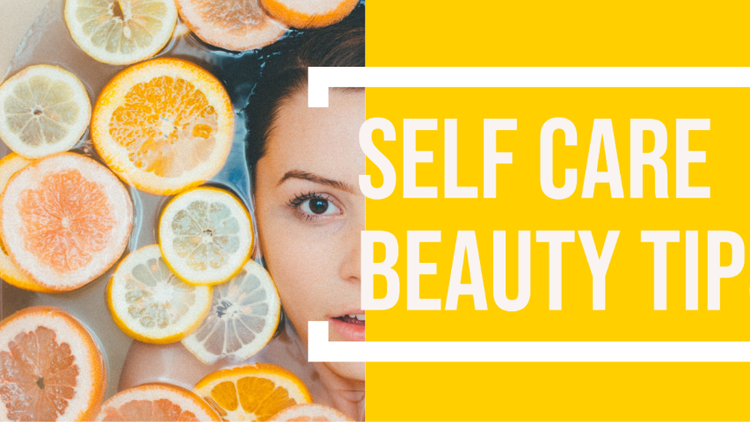
- Using brackets to frame text for emphasis.
- Enlarging letters to create a unique pattern.
- Blending typography with shapes to enhance creativity.
Icons, symbols, and characters help break up text visually while keeping the banner clean.
7. Pair fonts for maximum readability & impact.
An effective font pairing balances visual appeal and legibility.
Best practices:
- Combine a bold, decorative font with a simple, readable one.
- Use uppercase sans-serif fonts for strong headlines.
- Avoid using too many typefaces—stick to two or three at most.
Choose fonts that match your channel’s theme—playful, elegant, modern, or edgy.
8. Enhance text with stylish effects.
Text effects add depth and dimension, making your banner pop.
Consider using:
- Outline or shadow effects to create contrast.
- Cutout or overlay styles for a futuristic look.
- Blurred or faded text layers for a cinematic effect.
Text effects help emphasize important words or CTAs without overwhelming the design.
9. Utilize high-quality imagery.
A strong visual can immediately communicate what your channel is about.
Ways to incorporate images:
- Feature a high-resolution photo related to your content.
- Overlay text subtly so it doesn’t clash with the background.
- Use edited photography, filters, or gradients for a polished finish.
Your imagery should be crisp, well-lit, and aligned with your channel’s aesthetic.
10. Align banner imagery with your channel’s theme.
If your channel has a specific niche, your banner should reflect that focus.
For example:
- Travel vlog? Use scenic landscapes or passport stamps.
- Tech reviews? Feature gadgets and sleek digital graphics.
- Fitness channel? Showcase workout visuals or energetic action shots.
Ensure consistency across your banner, thumbnails, and profile picture for brand cohesion.
11. Create a visually stunning banner using icons.
Icons offer versatility and simplicity in design.
Try these creative approaches:
- Scale-up one large icon for an abstract look.
- Arrange multiple icons into a patterned background.
- Use icons as section dividers to separate text areas.
Icons help make a bold statement while maintaining a clean, modern aesthetic.
12. Leverage color psychology for maximum impact.
Colors influence emotions and engagement.
Consider:
- Bright colors to capture attention.
- Muted tones for a professional, elegant vibe.
- Contrasting color pairs (blue & orange, yellow & purple) to create striking visuals.
Make sure your color scheme aligns with your brand’s identity and readability needs.
13. Use a collage for a unique, engaging design.
If you want to showcase multiple visuals, a collage is a great solution.
Collage ideas:
- Mix photos and text for a storytelling effect.
- Divide sections using frames or borders.
- Blend icons, typography, and images for a modern, editorial look.
Collages allow you to tell a story in a visually compelling way.
14. Utilize panels and frames for a clean layout.
Dividing your banner into sections can make it easier to digest.
Ways to achieve this:
- Vertical or horizontal panels to create distinct areas.
- Bold frames around key elements to create structure.
- Negative space to prevent overcrowding.
Using frames and panels can organize your content while maintaining a professional look.
15. Layer images, graphics, and text for depth.
A layered approach adds a sense of movement and creativity.
Try:
- Stacking transparent overlays for texture.
- Combining photos with illustrated elements for a mixed-media feel.
- Using gradient shading to create a seamless transition between layers.
Layering elements makes your design feel dynamic and visually engaging.
16. Ensure your design fits YouTube’s safe area.
YouTube banners crop differently on various devices, so designing within the safe zone ensures clarity.
- Keep important text and visuals centered.
- Preview your banner across mobile, desktop, and TV displays.
- Test resizing options to avoid losing key elements.
A well-optimized banner ensures a consistent viewing experience across all devices.