




.
Get your designs printed and delivered to your door - plus, enjoy 50% off your order until January 15th (See terms).
Redeem now

18 Breathtaking banner ideas for design inspiration.

Explore this gallery of beautiful banner designs to get inspiration for building your very own with Adobe Express.

Design with your idea

1. Choose an image to illustrate your business goals.

Don’t just tell people, show them. Rather than using words to entice your audience, show them an example of what your brand or business has to offer – give them a taste of the experience. When you choose your image, be sure to include any other details that will be important for your reader to achieve your business goals. You can add a click here button as a call-to-action to drive conversions or feature your contact info or social handles for readers to learn more.
Brown Skincare Serum Web Banner
Edit this template

2. Enhance your banner with captivating imagery.

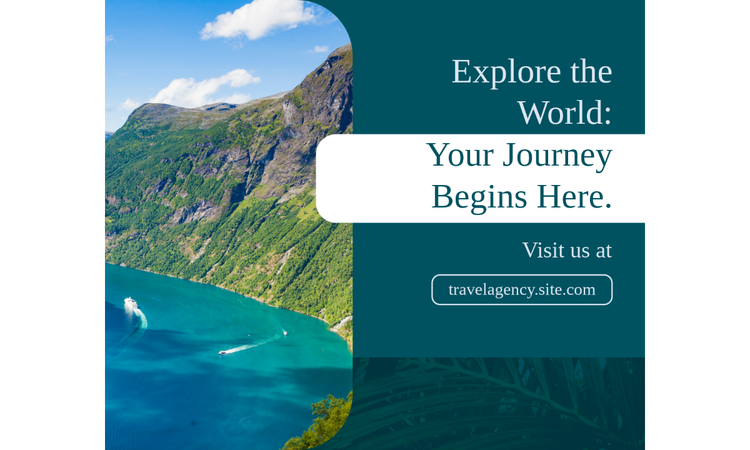
As the old saying goes, a picture is worth a thousand words. Save space on your design and communicate a powerful message with a strong photo. Upload your own photo or explore our library of stock photos. If your image portrays important details, avoid filling up the space with too much text and let the picture do the talking instead. Make it an immersive visual experience by making your photo full-screen.

Blue Travel Web Banner
Edit this template

3. Experiment with photo effects.

There are countless ways to manipulate, customize, and enhance photos these days. You can use free, online, or app-based programs, professional tools, software, or anything in between. You can enhance an image by making it brighter, sharper, or more focused. You can play with making more artistic changes such as adding filters, distortions, or glitch effects, like the one seen in these examples. Photo effects transform ordinary photos into something extraordinary. How can you take your image content to the next level to achieve the best banner design yet?

Blue Purple and Red Lifestyle Blog Banner
Edit this template

4. Play with overlaying text blocks.

Sometimes it’s easy to lay text on top of an image. But other times, if you have a busy photo or light-colored text, it becomes hard to read. One way to solve this and add emphasis to your text is to place it in a text block. You can achieve this with Adobe Express by using the Generate Text Effect option or placing your text on top of a color block or icon. In this example, the design emphasizes the text by using a faded overlay filter on the image, making the details in the image soft and contrasts against the bright, sharp text, resulting in the text as our focal point.

Green Graduation Class Web Banner
Edit this template

5. Create layers with images, text, and graphics.

As you craft your banner, allow yourself to think outside the box and try something unconventional. Find a captivating, relevant photo, then overlay shapes on top of it.

Grey Furniture Promo YouTube Banner
Edit this template

6. Provide extra insights by featuring a photo collage.

Another way to showcase imagery on a banner design is with a photo collage. Provide your audience with extra insight by using additional photo content in your collage.

7. Keep it simple but striking with a minimalist approach.

A design like these use simplicity to emphasize a message. In this case, we feel present by not feeling anything else from any other distractions on the page. Achieve simplicity by using minimal text in your banner or even using only your logo. Drop-in a colored background, simple photo, or a gradient photo such as the sky cropped to give this clean visual effect.

Beige And Gold Florist Store Facebook Page Cover
Edit this template

8. Explore exciting imagery options.

Bold imagery doesn’t only come from photos – you can also use graphics, illustrations, renderings, or other forms of art to feature your imagery. If you’re an artist, showcase a work of your own. Or find artwork that resonates with your brand or messaging. Our stock photo library offers lots of alternative mediums in addition to photography that you can feature in your design. As always, achieve a cohesive design by corresponding your imagery to match other elements such as the text or icons.

Purple & Orange Sound Facebook Cover Banner
Edit this template

9. Create a branded banner with your logo, slogan, or motto.

Making a banner for an organization or business? Show off your branding with a bold design. Showcase your logo, branded colors, wordmarks, branded imagery, slogan, or motto. Use this banner design to post as your social cover photos or get it made into a printed banner to take with you to company events and appearances.

Green And Black Fashion Facebook Page Cover
Edit this template

10. Introduce yourself to your audience with a self-portrait.

Are you the face of your brand or business? Why not feature yourself on your banner. Showcase a self-portrait on your banner so your audience can get to know you and recognize you in the future. You can frame your photo full-screen, like it is here, or feature it in a photo collage or smaller frame in your layout. Be sure to choose a recent and relevant photo and make sure the image communicates the same message as any other copy or content in your banner for clear messaging.

Pink Jewelry Tips Youtube Thumbnail
Edit this template

11. Use attention-grabbing colors.

Color is a great tool for catching your reader’s eye. But before you get to designing, think about what specific colors communicate. Think about the intent behind your colors, what they can communicate in your banner, and how your viewers might receive them.

Orange and Pink Gradient Nail Art YouTube Thumbnail
Edit this template

12. Play with contrasting colors.

While bright colors may catch your attention, using contrasts adds to the potency. Contrast is a tool to make two things stand out in a design and against each other. Generally, light contrasts with dark things, but you can also achieve a similar effect by exploring color blocking or complementary colors on a color wheel.

Red and Yellow Fast Food Web Banner
Edit this template

13. Feature icons as imagery.

Icons are an excellent design tool. Icons can save time in the design process instead of making your own imagery and illustrations. Icons also allow for consistency, as often styles of icons match with each other, and you can customize the colors to your specific needs. You can enlarge icons to make them background images or use them as social icons or wayfinding symbols.

Beige & Purple Take Memories Facebook Cover Banner
Edit this template

14. Choose bold, impactful fonts.

Make a statement with a unique font choice that matches your banner’s personality. If you’re making a professional banner, you might want a more traditional or modern font. But if you’re making a banner for something fun and creative, explore all the possibilities. Choose a bold font and use it for your header, experimenting with color and placement until you find the perfect fit.

Monochrome Retro Movie Channel Youtube Banner
Edit this template

15. Say something exciting with text effects.

Announcing a sale is a common marketing campaign used by companies. To get someone’s attention these days, you really have to think outside the box. You could use size, color, or engaging fonts to emphasize the sale announcement. Add text effects to your tool belt and explore all the new ways to showcase your banner’s copy. You can find the Generate Text Effect tool in your Adobe Express workspace and remix your font to perfection.

White, Minimalistic Sale Ad Facebook Post
Edit this template

16. Play with unconventional type design.

Text doesn’t always need to be crystal clear to get a message across. Creative, artistic design choices like this example are encouraged. Consider ways you can turn your type into a part of the design. Create dimension by layering small type on top of larger type or play with unconventional placement options. Place your text design on top of a background image for added action. Creations like this are a great approach for sports and entertainment as they communicate high energy and excitement.

Purple Monochrome Sport Team Facebook Post
Edit this template

17. Use repetition and variation to create a dynamic effect.

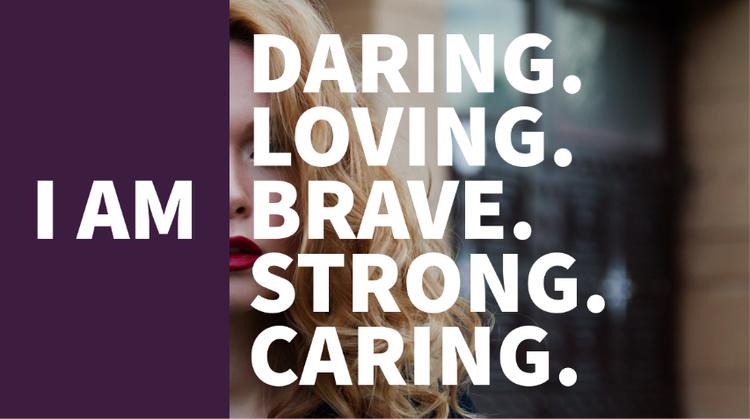
In design, repetition creates a pattern for the reader to understand and variation in the pattern creates emphasis. These can be powerful tools to help you as you build your banner. Here, we have repetition with the adjectives and variation with the style when you see brave is bold and opaque to match the I am. Play with repetition in your text or imagery, or use icons to create a pattern. Based on where your banner will be presented, explore opportunities with these design tools to serve the banner’s purpose.

Purple and Cold Toned Inspiration Catchphrase Facebook Post
Edit this template

18. Showcase a quote with your banner design.

Banners are a great piece of artistic real estate for sharing impactful or relevant quotes. If you intend to drive home a powerful message, display your quote in a striking font and pair it with a powerful image. If you’re going for something more poetic, pick a more subtle font, scale down the size, place it off-center, and showcase an image that matches the sentiment to really set the mood. If you’re using your banner as a social media header photo, be sure to place your quote on your canvas where it will be legible when cropped. If you’re printing your banner, make sure the quote is large enough to be read from a distance.

Beige & Purple Gradient Stylish Quote Banner Background
Edit this template

How to make a banner with Adobe Express.

1

Start with inspiration.

We hook you up with thousands of professionally designed templates, so you’re never starting from a blank canvas. Search by platform, task, aesthetic, mood, or color to have fresh inspiration at your fingertips. Once you find a graphic to start from, just tap or click to open the document in the editor.

2

Remix to make it your own.

There are lots of ways to personalize the templates. Change up the copy and font. Sub out the imagery with your snapshots or short video clips. Or browse from thousands of free images right in Adobe Express. Spend as little or as much time as you want to make the graphic your own. With a premium plan, you can even auto-apply your brand logo, colors, and fonts, so you’re always #onbrand.

3

Amp up the flair.

It’s easy to add extra flair and personality to your projects with our exclusive design assets. For example, apply a text animation for short-form graphic videos in one tap. We’ve taken care of all the boring technical stuff so you can focus on your message and style.

4

Resize to make your content go further.

Gone are the days of having to memorize image dimensions for every single platform. Once you’ve landed on a design you like, you can easily modify it for any social network by using our handy resize feature. Simply duplicate the project, hit resize, select the platform you want to adapt it for, and we take care of the rest.

5

Save and share your custom banner.

Once your design is complete, hit that publish button and share your design with others. Adobe Express saves your designs, so you can always revisit your project if you need to update it in the future.