


Brochures needn’t be boring – they’re an advertisement for products and services, but they also represent your company. Give your brochure the branding it deserves and give your showcase a splash with free brochure mockup ideas and templates from Adobe Express.

Free brochure mockup ideas.
Don’t get stuck on your brochure design. Get free brochure mockup ideas from Adobe Express today.

Easy all-in-one editor

One-click edits from any device

Fast creation with generative AI

Thousands of professionally designed templates
Summary
What is a brochure mockup?
Think of a brochure mockup as a “proof of concept”. It’s a digital blueprint of your brochure before it goes to print that allows designers and clients to picture that brochure’s appearance (and make easy suggestions or changes). In any type of design work, mockups are an essential part of the design phase.
While a brochure mockup could be an example, giving context to the design can help clients to visualise your intent. You can go further than just using it as a digital blueprint too. For example, you could put your brochure mockup in a simulated environment, such as on a table or in someone’s hand digitally to give it some real-world context.
Your brochure mockup should represent the final design in terms of size, layout and how it might appear in different materials, such as glossy paper. Try to include a range of angles, lighting and backgrounds too.
Why use a brochure mockup?
While brochure mockups are just fun to design, they play an important role in design work. Some of the reasons you might want to use a brochure mockup include:
- Cross-team collaboration. If you’re working with other teams, you might need feedback. For example, the product team may want to focus on updating the branding to reflect a new product or shift in a company’s direction. Or they want a spread for a new, poster child product.
- Get feedback on different mockups. If you’re in a design ideation phase, you may want to present your client or team with a range of choices. By presenting a range of brochure mockups, you can accrue a variety of feedback to make the perfect design.
- Track your changes along the way. With a selection of brochure mockups, you can track any version changes along the way complete with the feedback. This could help if you’re challenged by your client and demonstrate the evolution of the project. It also means if something needs to be rolled back, you have the old version on hand.
- Create realistic previews. Once a brochure is in production, it can start accruing costs rapidly – that means someone changing their mind carries a cost. Brochure mockups offer contextual and tangible previews to ensure the brochure hits the intended tone and message by the time it’s ready for print.
- Personal portfolio development. As a designer, having a selection of brochure mockups can be a great way to bolster your portfolio. They also demonstrate your ability to action feedback and interpret a brief.
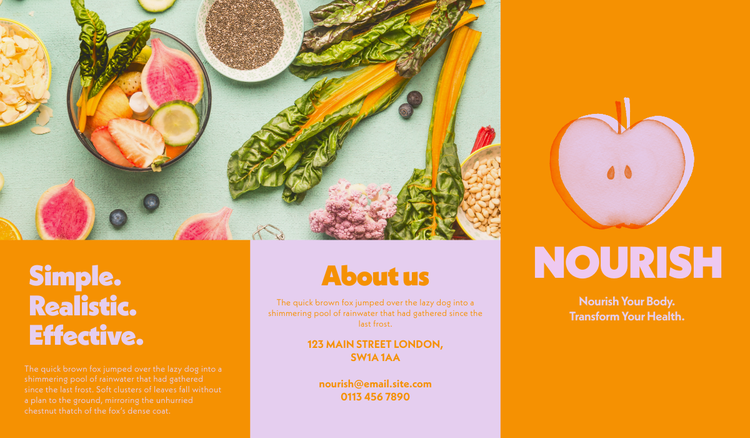
4 landscape brochure mockups.
Get started on your landscape brochure mockups with a free template from Adobe Express. Give your brochure mockup a cinematic flair with a stand-out landscape layout. With landscape brochure mockups, you can include more text and wider images for a unique (yet practical) twist on brochure design.

4 square brochure mockups.
It’s hip to be square, and these square brochure mockups let you do just that with your designs. Square brochure mockups are a great way to deliver a pocket-sized proof of concept that can fit any product.
4 A4 brochure mockups.
Some things just don’t go out of fashion, including A4-sized brochures. With a practical and standard size, as well as enough versatility for a range of brochure purposes, A4 is one of the most widely used sizes in print and design.
4 A5 brochure mockups.
Turn your brochure mockup into the perfect booklet with our range of A5 brochure mockup templates. While they might be a bit less standard than an A4 brochure, they’re easy to use, portable and a great size for almost all information.
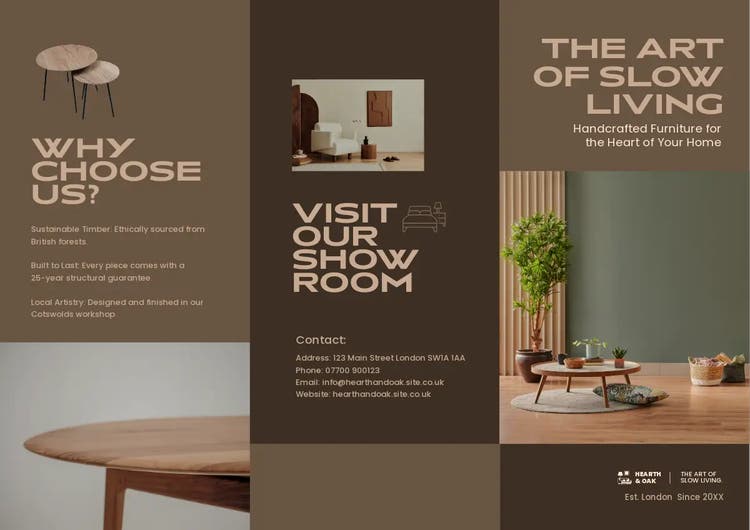
4 tri-fold brochure mockups.
You don’t have to try hard to design the perfect tri-fold brochure mockup. These brochure mockups are folded twice, resulting in six panels structured like columns. They’re perfect for a concise but comprehensive look at your products, even though you might lose a bit of space for imagery.
How can Adobe Express help you make a brochure mockup for your business?
1. Make a custom brochure for free with the Adobe Express app.
Making a brochure mockup is easier than ever with Adobe – try out our intuitive and complete Adobe Express brochure creator today for quick and effective mockups.2. Explore different types of editable brochure templates.
Got an idea? Try it out without the effort of creating brochure mockups from scratch with free brochure templates from Adobe. Explore, ideate and create with free brochure templates today.3. Add your own logo and branding for business brochures.
Give your brochure mockups the stamp of approval and add your own custom logos. Keeping your brochure on brand couldn’t be easier, with the Adobe Express logo creator.
Turn your brochure into a poster, flyer and more with AI.
Don’t scrap your work – turn your brochure into a poster, flyer or social media post in minutes by harnessing the power of generative AI. Retain specific products, design elements or branding across a range of mediums and generate designs in minutes.
Simply describe what you want to generate and go from idea to output, fast. Create daily mockup content easier than ever with Adobe’s AI.
You might also like...


Good to know.
How do you make a brochure mockup for a portfolio?

Try using an online brochure maker to create a range of mockups and try to work to a brief – even if it’s made up. Consider the requirements of the brochure, the target audience and the intent. You can describe these alongside your mockups in your portfolio.
Can I print my brochure mockup?

Is Adobe Express free?
How do you make a brochure mockup for a portfolio? opened
