How to make a business website.
Learn how to make a business website – step by step.
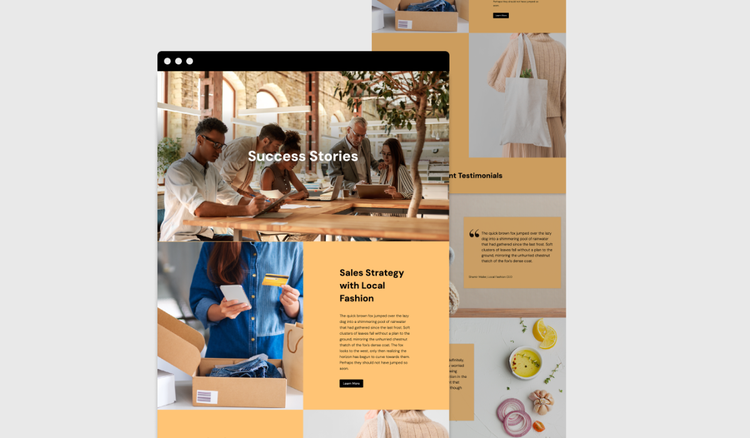




Your website is often where first impressions become lasting connections. Whether you're launching a new venture or growing an established brand, a thoughtful website can help tell your story, build trust, and give customers a reason to choose your business.
From branded graphics and website content to social media assets and marketing campaigns, Adobe Express can help you create a cohesive online presence that brings your brand to life.
What is a business website?
Whether you run your own cleaning business, sell digital products, or run a small business, in 2025, every business needs a website.
Why? A business website is the digital face of your business: it’s open 24/7 and usually the first place potential clients or customers go to find out what you offer and how to contact you. A good website introduces your business, reflects your personality or brand, and makes it easy for people to take action – whether that’s getting in touch, making a purchase, or simply learning more about your business, products or services. In other words, in today’s online-first world, having a business website is not optional, but essential to be successful.
The good news: As business websites have become a standard, creating them has also become much easier. Making a business website in 2025 isn’t complicated, as long as you know the basics and have the right tools. In this guide, you’ll learn how to make a business website, optimise it for users and search engines, and how Adobe Express can help you design web graphics and visual content to make your page stand out. Let’s dive in!
Making a business website: 8 steps to build your online presence.
Creating a business website might feel overwhelming, especially with no web design experience. However, it’s entirely doable, even if you’re not a developer or designer. Clarity matters most: knowing what your website should do, who it’s for, and how to guide people through it. Follow these eight steps to build a professional, purposeful website that reflects your brand and helps you bring your business to the next level:
Step 1: Start with a clear concept for your business website.
First things first: Your initial step should be to clarify why you want to make a business website. Is it to sell products, enable customers and clients to book appointments, showcase your portfolio, or provide contact info?
Your website’s purpose should shape every following step – from layout to content to features to web graphics. Define and write down your thoughts and ideas in a comprehensive website concept.
Step 2: Choose a platform to host and build your business website.
There are many platforms to build and host your website. Usually, they offer all-in-one services, including hosting, tools to build a website, blog, or online shop, and even user-friendly website templates to use as a base. To create a basic website, coding skills are not required.
Consider different platforms and decide based on your comfort level, your budget, and how much time you want to spend maintaining the website. Different providers specialise in different areas – some platforms are ideal for online shops and e-commerce, some are good for simple websites, others offer more advanced functionalities but also require more web development knowledge.
Step 3: Secure a domain name for your business website.
When you make a website, you need a domain name. Your domain name is your web address – e.g., www.adobe.com/uk/.
Try to match your domain name to your business name or offering. Aim to make it short, clear, and easy to remember. Whenever possible, go for a .com or your country-specific domain (such as .co.uk for UK websites), and avoid numbers or hyphens. Check the availability of your chosen domain – each domain can only exist once.
Tip: Make this decision carefully. Once you’ve selected a domain name for your business website, changing it is complicated.
Step 4: Structure your business website.
The next step is to structure your business website and lead the users where you want them to go.
Think about user flow: How do you guide someone from landing on your site to taking the action you want them to take? Visitors shouldn’t have to guess where to click next, so keep the website structure intuitive and straightforward. Only add pages and sections you really need – e.g., a clear homepage, an “about” page, a services or products section (or individual pages, if you need to provide more information), contact information (plus a contact form) and potentially a blog or resources page. Group content logically and keep the navigation bar minimalistic and easy to understand.
Step 5: Add relevant text to your business website.
A website without content is just like a blank piece of paper. Now, it’s time to tell your story and fill your business website’s structure with meaningful content.
Keep in mind that every piece of copy needs to do a job. Start with headlines that tell people exactly what you offer. Keep paragraphs short, break up long text with visuals or subheadings, and include clear call-to-action buttons (such as “Book a call”, “Browse packages”, or “Get in touch”). Let your brand personality and voice shine through, but don’t overdo it – keep it professional and avoid jargon.
Step 6: Optimise your business website for users and search engines.
When you make a business website and want it to be successful, it needs to be optimised for website users and search engines. That means considering both user experience (short: UX) and search engine optimisation (short: SEO). Here’s what you need to consider to make your business website easy to find AND easy to use:
Optimising a business website for users:
- Make sure your site is mobile-friendly, as in 2025, most people will visit from a mobile device.
- Improve page speed by compressing images (you can use the free Adobe Express image resizer).
- Keep accessibility in mind. That means using accessible fonts, clear contrast, and logical headings for readability.
Optimising a business website for search engines:
- Include relevant keywords (you can use free keyword research tools to find out which ones to use) in your page titles, headers and copy.
- Write meaningful metadata (the little preview you see in the search results) for each page. Make sure metadata covers the essence of your page and includes relevant keywords.
- Add alt text to images and use descriptive, meaningful URLs.
Tip: Usually, you can make these optimisations directly in your platform’s website builder.
Step 7: Bring your business website to life with graphics that reflect your brand.
Now, it’s time to add some colour to your business website. Use high-quality images, icons, and personalised web graphics to visualise your products and services, make key points stand out, and give your business a face. Even if you aren’t a professional photographer or graphic designer, avoid overusing stock photos – it’s better to aim for personality than perfection.
Read on to discover how Adobe Express can help you design custom graphics, banners, and branded visuals that match your style. Whether you need a logo, hero image, testimonial block or call-to-action banner, you’ll find templates that help you do it yourself.
Step 8: Test and launch your business website – and keep improving.
When your business website is filled with copy and visuals, you’re ready to go live. However, don’t forget to do some testing beforehand. Preview your business website on multiple devices and browsers to make sure everything works and looks good. Test all your links, forms, buttons, and checkout flows to make sure there are no errors. Ask someone outside your business to do a test run, too – they’ll likely spot gaps or mistakes you may have missed.
Once your site is live, things aren’t done and dusted. Website builders often include analytics tools which you can use to monitor how your business website performs, which pages get traffic, and where users drop off. A website isn’t a one-time job, but a process – so update it regularly, fix what doesn’t work, and use what you learn to improve over time.
recipe
What to include on a business website.
Not every business is the same, and accordingly, the structure of a business website can look different. You’re unsure how to make a business website that includes all the relevant things? The following section gives an overview of the most common building blocks, core pages and elements. What's important is that you customise your website according to your needs. For a small business, a homepage with a contact form may be perfectly adequate – but if, for example, you sell digital products, your website may benefit from a few more functionalities and subpages.
- The home page: Your homepage is the most important page of any website. It’s usually the first page users land on when visiting a website. Thus, it should immediately tell them who you are and what you do and enable them to take action. Use a clear headline, a short intro, an eye-catching web graphic and a strong call to action.
- The “about” page: This is where you can build a connection and get personal. Share the story behind your business, your values, and why you do what you do. However, be careful to keep it focused: it’s not just about you, but about why you (and your business/services/products) are the right choice for potential clients and customers.
- Service or product pages: This is your chance to explain what you offer. You can make this a section of your home page, or, if your products/services require more information, even create subpages. Break the information down, be clear, use visuals if possible, and try to answer users' questions.
- A contact page: Make it easy for people to reach out to you. Include your email, phone number, social handles, and a simple contact form (depending on where and how you want to make yourself available). If relevant, add your location info, business hours, or booking links.
- Sections or pages for testimonials or social proof: People trust others and their experiences. If available, show reviews, client feedback, press mentions, or case studies to add credibility. Real names and photos (with permission) can make it feel more genuine. This can be a section of your page, or even a subpage, if you have more content available.
- Legal pages: Depending on where your business operates, you might need to add legal pages – such as a privacy policy and cookie consent notice, terms and conditions page or an imprint.
- Optional sections or pages: If you want to boost SEO, share business updates, or establish your expertise, a blog or articles section can add value to your business website. Just make sure you can keep it updated, as an empty blog looks worse than no blog at all.
recipe
How to bring your business website to life.

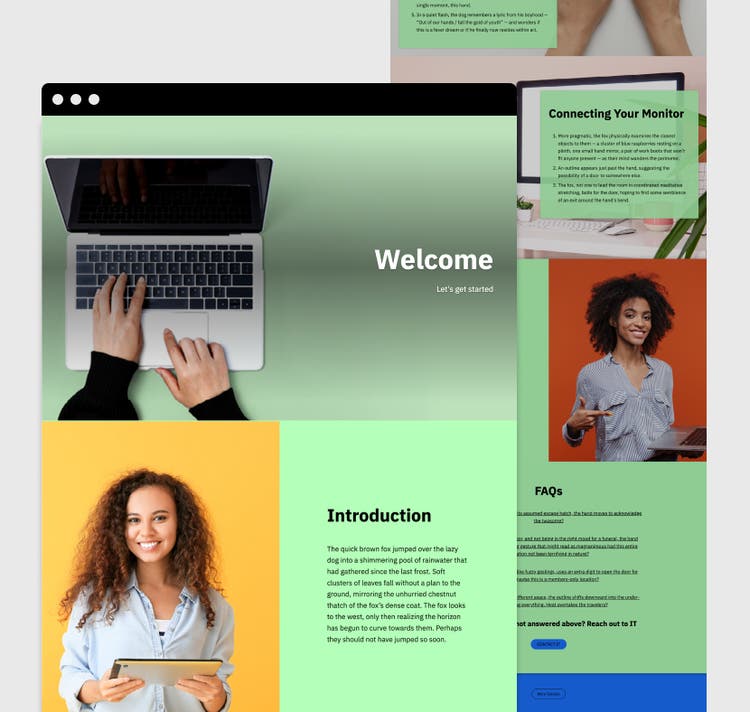
Design web graphics with Adobe Express.
Appealing web graphics are essentially the pixie dust that turns a boring website into an outstanding one. With Adobe Express, you have a suite of tools and templates to help you design professional-looking visuals – without needing design skills. Here's how you can use Adobe Express to make your business website outstanding:
- Website banners: Design header images or website banners using templates, which you can adjust to your liking and branding. Easily upload your own assets, apply brand colours, and add headlines.
- Website logo: Use Adobe Express to create a business logo for your website’s header – such as a custom logo lock-up, favicon, or menu background.
- Blog templates: If you want to add a blog to your business website, Adobe Express has your back. Discover professionally designed blog templates and use them as a base for your own blog – making blogging easier, more appealing and fun.
- Testimonials: Highlight customer reviews or client quotes by using stylish testimonial templates. Pick a layout, apply your fonts and colours, and insert customer quotes (make sure you are allowed to use them), images or logos for added trust.
- Clean product images: Use the remove background features of Adobe Express to remove the background of product photos to create clean, professional product images.
- Background graphics: Design subtle background graphics, icons, or illustrations to break up long pages and improve readability.
- Photo collages: If your site features “As seen in” or “Our clients” sections, use Adobe Express to arrange images or logos into stylish photo collages.
- Infographics: If you want to include data, use Express to turn numbers into infographics – perfect to visualise product benefits, business data, or statistics.
- Social media posts: Promote your website via LinkedIn, Instagram or Facebook with engaging social media posts.
Make your business website with Adobe Express.
A business website is your chance to show who you are and what you offer. With Adobe Express, making a professional business website is easy and fun. Make your business website stand out with branded graphics, banners, product images and more to give it a professional look and feel. Thanks to ready-made templates, you don’t even need design skills to bring your business website to life.