The ultimate guide to Twitter image sizes.
Learn how to size, format, and maximize your image’s potential with our Twitter image size guide.





Strong visuals can help your content stand out in a fast-moving social feed. Using the correct image sizes for X helps ensure your posts, headers, and graphics look polished and professional wherever they're viewed.
Create attention-grabbing social graphics and branded content for X with Adobe Express.
Twitter header image size.
- The ideal image size for your Twitter header photo is 1500px by 500px.
- Keep in mind that header photos display differently on various devices. You may experience cropping of around 60px on both the top and bottom of your header photo, so keep any important information near the center.
- Don’t forget that your profile photo will also block part of your header in the lower-left corner, so avoid putting any key visual information there.
- Twitter supports images that are JPEG, GIF, or PNG file formats.
- If you experience any errors in the upload process, be sure your browser is up-to-date, or try using a different browser.
Keeping track of the header sizing requirements can be a bit overwhelming. Adobe Express keeps things simple by providing professionally designed templates that are already sized to fit your header photo space. Find a free template that resonates with your creative vision and customize it to perfection. Just remember to keep all important visual information in the central safe zone.
recipe
Twitter profile image size.
- The ideal image size for your Twitter profile image is 400px by 400px.
- Your profile picture will be uploaded as a square, but it’s actually displayed as a circle throughout the site. Make sure that your image maintains its integrity when cropped into a circle. If you lose any important details in the cropping process, try using a different one.
- Twitter supports images that are JPEG, GIF, or PNG file formats.
- The maximum file size for a profile image is 2 MB.
If you need further guidance with customizing your profile, read Twitter’s tips for building up your profile. Or, if you’re looking for help troubleshooting with uploading your profile image, explore more detailed suggestions from Twitter’s help page.
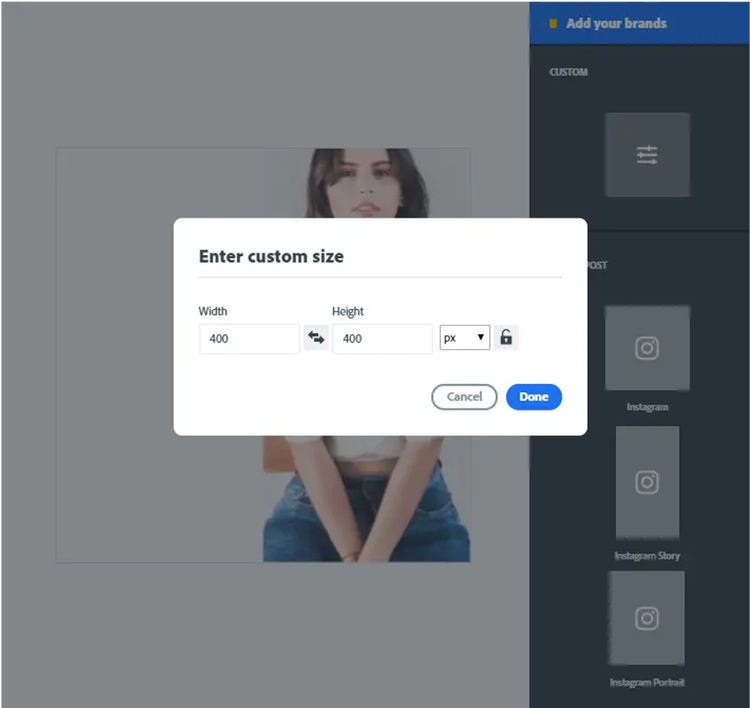
While Adobe Express comes loaded with pre-made template sizes for you to choose from, we also know that sometimes you’ll have specific creative needs, like a Twitter profile photo.
Use the custom size option under resize in your Adobe Express workspace to enter precise measurements in pixels, inches, or millimeters. In this case, type in 400px by 400px, and you’ll have yourself the perfect canvas to make your custom profile image.
You can even drop a temporary circle outline graphic (with a 400px diameter) into your design to predict where the cropping will occur so you can optimize your image’s composition.
Twitter in-stream image size.
- In-stream images are displayed at a 16:9 ratio of 600px by 335px and can be clicked and expanded up to 1200px by 675px.
- This means is that you can upload any shape photo, be it square, vertical, or horizontal. It will just be cropped in a 600px by 335px preview in-stream and display in full once clicked on.
- For best results, make sure your image is no larger than 5 MB.
- Twitter supports in-stream images that are JPEG, GIF, or PNG file formats.
- If you’re uploading GIFs, go for one that loops. Twitter supports looping GIFs. Any GIFs that are not set to loop will display as a static image.
Looking to share image content with your tweets? Get started with our professionally designed templates to help inspire your creativity.
Choose from image-focused templates, infographics, marketing promotions, and more. You can even duplicate and revise any template you make for future use to create consistency in your feed. Explore animated templates on the Adobe Express mobile app for a more dynamic design.
recipe
Twitter ads image size.
- Images in both standard and promotional Tweets should be at least 600px wide. Aim for something closer to 1200px for the highest quality. Any height is acceptable up to a 1:1 ratio.
- On a desktop, images are accepted between a 2:1 and 1:1 ratio. On mobile, images are displayed at a 16:9 ratio.
- You can post up to four photos in a single tweet.
- Twitter supports in-stream images that are JPEG, GIF, or PNG file formats.
- For best results, make sure your image is no larger than 5 MB.
- Animated GIFs cannot be included in tweets with multiple images.
When creating your image content for your tweets and promotions, look no further than Adobe Express. Log in to the workspace and enter precise measurements in pixels, inches, or millimeters. Search the library of templates to get inspiration or use the layouts option to format your composition with a mix of images, icons, and text.
recipe
Twitter video ads and thumbnail size.
- When it comes to tweeting videos, the approved file types are MP4 or MOV.
- For best results, make sure your video is no larger than 1 GB, and you may only upload one video per tweet.
- An ideal video length is about 15 seconds or less, with a maximum length of 2 minutes and 20 seconds.
- Twitter recommends videos that are 1200px by 1200px, or a 1:1 ratio, as this will appear consistent on both desktop and mobile platforms. Videos in a 16:9 ratio, be it vertical or horizontal, will be cropped in feed and appear in full when expanded.
- Video thumbnails should match the aspect ratio of the video. JPEG or PNG files are accepted.
Head to Adobe Express to make your video thumbnail using the same aspect ratio to match your video. Add images, icons, and eye-catching text to create a thumbnail that successfully speaks out for what your video has in store.
recipe
Twitter cards image size.
With Twitter Cards, you can use eye-catching imagery and video to drive conversion, create an engagement, or start a conversation with your audience. There are several types of Cards:
Website Cards are used to link your audience to your website or a landing page. Be sure to include a call-to-action in the copy of your tweet to direct your audience where you want them to go.
App cards are used to promote a mobile app in the Twitter feed and link your audience to connect with the app.
Direct Message Cards are used to motivate users to start a conversation with your brand’s chatbot in their direct message inbox. Creating an eye-catching card using imagery or video is the key to initiating this conversion.
- The ideal image size for Twitter Cards is 800px by 418px, a 1.91:1 ratio. For App Cards, you can go with 800px by 800px for a 1:1 ratio.
- Videos can also be used in Twitter Cards. The recommended size for Website Card videos is 1200px by 1200px, or 1:1 aspect ratio. For App Card and Direct Message Card, the recommended size is 640px by 360px for a 16:9 ratio, or 360px by 360px for a 1:1 ratio.
- Twitter supports images that are JPEG or PNG format; no GIFs are allowed here.
- For best results, make sure your image is no larger than 3 MB.
- The approved file types are MP4 or MOV, ideally less than 30 MB in size, and no more than 1 GB when it comes to videos.
- Twitter advises a short video for these cards, so aim to keep it less than 15 seconds.
- For videos, place your logo in the upper left-hand corner.
- All Website Card videos are required to have closed captioning or text overlays.
Guide to Twitter image sizes.


Let Adobe Express be your Twitter creative content guide.
Twitter is an incredible online world to connect with friends, family, followers, and new audiences. Twitter serves as a place for impactful original content, trends, movements, and conversations. Contribute to the community by serving up beautiful, engaging, and share-worthy content. Let Adobe Express guide you to creating impressive content by making it easy to meet image sizing requirements with pre-made templates and canvas sizes. Take pride in what you make so you can enjoy sharing it with the world to see. In a content-driven world, creativity is embraced, so make something that stands out.