How to write an invoice (A complete step-by-step guide with examples).




Think back to your last project where you wrapped up the work and felt a wave of relief, then opened your email and saw no confirmation of payment—or worse, silence from the client. Suddenly, what should’ve been a smooth finish turns into an admin scramble. That’s where an invoice becomes an important part of any transaction.
Invoicing is about building a system: one that tracks what you’ve delivered, sets expectations for payment, and gives you a record for taxes and bookkeeping. Organized records reduce mistakes and save hours of panic down the line.
For freelancers in particular, the stakes are high. A 2025 report by Remote found that 85% of freelancers have had their invoices paid late at least some of the time, and over 21% experience late payment or non-payment more than half the time.
When every invoice matters, missing a detail or sending a sloppy format can mean delayed cash flow, lost confidence, or worse. In this guide, you’ll learn everything from what an invoice should include to how to format, send, and track it, plus ready-to-use templates in Adobe Express.
What is an invoice, and why do you need one?
An invoice is a formal request for payment. It lists the work you’ve done or the products you’ve supplied, along with the agreed price, and tells the client: “This is what you owe me, and by when.”
The business and legal functions of an invoice.
When it’s time for taxes or when you want to measure business performance, invoices are foundational. They help you track income, tie it to expenses, and show regulators or accountants exactly what occurred.
Accurate invoices also make tax time much simpler. Clear documentation supports deductions, helps with filing obligations, and avoids costly mistakes down the road.
Why invoices are important.
Invoices help with:
- Professionalism: A well-structured invoice sends the message that you’re serious about your work and your payment terms, which is good for client trust.
- Documentation: Everything is laid out (like your services, rates, dates, and terms), which reduces “I thought you meant…” or “Why is this cost here?” confusion. Having clarity protects both sides.
- Payment tracking and cash flow: With a clear invoice, you can monitor which payments are outstanding, follow up on late payments efficiently, and more accurately forecast your cash flow.
For example, freelancers (e.g., graphic designers, writers, consultants) finish a project and send an invoice so you’re clear about scope, cost, and due date. If you have a product-based business, you supply goods, ship them, and send an invoice so both you and the client have a formal record of sale and payment obligation.
In short, think of an invoice as the formal handshake between deliverables and payment. When used consistently and professionally, it becomes a powerful tool for keeping your business organized and respected.
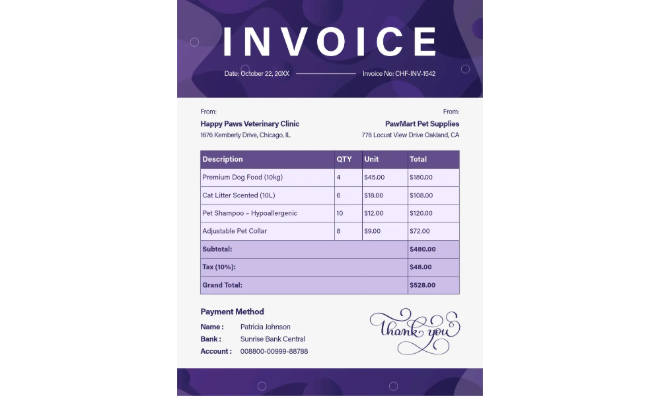
The essential parts of an invoice, with a template breakdown.
A solid invoice needs to have all the relevant sections filled up. Here’s what goes where.
A well-structured invoice includes all key details to ensure smooth transactions. Here’s what to include in each section:
- Header: Add your business name, logo, and contact information.
- Client details: Include the client’s name, address, and contact information.
- Invoice number: Assign a unique identifier such as a date, order number, or invoice code.
- Important dates: Specify the issuance date and the payment due date.
- Itemized list: Describe each product or service, including hours, quantities, rates, and totals.
- Payment terms: List accepted payment methods, due dates, and any late fees.
- Subtotal and tax: Provide a breakdown of all fees, taxes, and total payment amounts.
If you create invoices in Adobe Express, you can use pre-built layouts that already include these sections. These would definitely come in handy when you need invoices in a flash, instead of having to build and manually input details from scratch.
How to write an invoice: a step-by-step guide for beginners.
Here’s a detailed breakdown of the 8 essential steps you’ll follow to write an effective invoice. Each step is designed to ensure clarity, professionalism, and faster payment, and they’ll work whether you’re a freelancer, service provider, or small business.
Step 1: Choose an invoice template that fits your business.
Start by selecting a template that aligns with your brand and business type. If you’re a freelancer, look for a clean layout with plenty of whitespace, a prominent header, and space to list “hours worked” or “project deliverables.” For service-based businesses, you might pick a design that allows room for itemized tasks and materials.
Using a pre-formatted template means you won’t overlook important invoice fields later. Choose a template format you’re comfortable editing and make it your go-to for repeat use.
Step 2: Add your business and client information.
Next, fill in the header with your business details: name (or your name if self-employed), address, phone/email, and optionally your logo or website. Then add the “Bill To” section: client name, company, address, and relevant contact person. Accuracy here ensures the invoice goes to the right person and supports bookkeeping or tax recording later.
Step 3: Assign an invoice number and date.
Every invoice should have a unique invoice number and an issue date (and possibly a due date). This helps you keep track of each invoice and makes it easier for your client’s accounting team to process. To make things more streamlined, pick a numbering system that’s simple and scalable (e.g., “2025-001”, “2025-002”), so you can tell at a glance how many invoices you’ve issued in a year.
Step 4: List services or products clearly with pricing.
In the main body of the invoice, itemize what you’re billing. List down each service or product, description, quantity or hours, unit rate or price, and line total.
Best practices include:
- Using plain language that the client will understand (for example: “Website redesign - 20 hours @ $60 per hour”)
- Avoiding lumping everything into one line—break down large jobs into smaller deliverables if possible
- Including any expenses or reimbursables with their own line item in the final tally
Step 5: Include taxes and total.
After listing your items, present the subtotal, then any tax (sales tax, VAT, service tax) if required, and then the grand total. This ensures transparency on what the client owes. If you’re exempt from charging tax, make a note (e.g., “No sales tax due—tax ID on file”) so the client isn’t surprised.
Step 6: Specify payment terms and methods.
Different payment methods work with different vendors. Here’s an example from PayPal where you can opt to pay with either a debit or credit card, or you can also use your PayPal balance.
Other invoicing systems, however, don’t have the automated payment setup PayPal does. For a smoother billing process, set clear payment terms. Add when the payment is due (e.g., “Net 30 days”), and how payment can be made (bank transfer, card, PayPal, check). You might also include a late-fee clause (“1.5% monthly late fee after 30 days”). When terms are unambiguous, clients are more likely to process the invoice on time, and delay is less likely.
Step 7: Add personal notes or branding.
This is the section where you add a human touch and make the document unmistakably yours. Insert your logo, color accents, or a short thank you note, like: “Thanks for trusting me with your project—looking forward to working together again.” While optional, these touches help build trust with clients.
Step 8: Review, export, and send to your client.
Before hitting “Send,” take a moment to review the invoice:
- Are all amounts correct?
- Is the client's name and address right?
- Is the invoice number unique?
- Are payment terms clear?
- Has your logo or branding stayed readable after export?
Once confirmed, export the invoice (PDF is best for preserving formatting) and send it—ideally through email. A good subject line might read: Invoice #2025-007 – [Your Service] – [Client Name]. Start with free customizable templates in Adobe Express to design your on-brand invoice in minutes and streamline your process.
Answering the question: how to send an invoice?
A well-written invoice email can spell the difference between getting paid on time and a delayed payment. According to Billdu, a courteous email is 12% more likely to be paid within a week compared to emails that barely have any pleasantries. Here’s a sample email template you can use when sending your email:
Hi [Client Name],
Please find attached Invoice #104 for [Project Name].
Payment is due by [Date]. Thank you for your continued trust and collaboration!
Best regards,
[Your Name]
Then, once the email is ready, you can attach your invoice in PDF format and send it. However, the work doesn’t end yet. Tracking your invoices ensures you know when payments are being processed or when a gentle reminder is needed. Here are three ways to stay on top of your invoices:
- Spreadsheets: If you’re just starting, use a simple tracker with columns for Invoice #, Client Name, Date Sent, Due Date, and Status.
- Accounting or project-management tools: Platforms like Wave or QuickBooks Self-Employed send automatic reminders before due dates and log payments when they arrive.
- Adobe Express recordkeeping: Save invoice copies and templates directly in Adobe Express, so you can edit, reissue, or reuse them for recurring projects without starting from scratch.
To follow up, send a friendly reminder 3 to 5 days before the due date. Follow up again one week after the due date if unpaid. Make sure to keep messages polite and factual. For example, “Just checking in on the status of Invoice #104, originally due [Date]. Let me know if you need another copy.”
How to customize invoices for different use cases.
Invoices can be used across industries, but they must also be customized accordingly. Here’s a quick rundown of the most common industries that use invoices and the key elements of each invoice type.
Freelance work.
Freelancers thrive on clear scopes and transparent billing. Include:
- A brief project summary (“Brand strategy development – 15 hours @ $50/hr”)
- Deliverable milestones or specific phases
- Optional: “Thank-you” note to encourage future collaboration
Creative or service-based business.
For designers, photographers, or marketing agencies, specify:
- Deliverables and revision limits (e.g., “3 design drafts, 2 rounds of revisions”)
- Usage rights or licensing terms, when relevant
- Retainer or deposit details for long-term clients
Product-based or commercial invoice.
If you sell physical goods or operate an e-commerce store, add these to your commercial invoice:
- SKU numbers, item descriptions, and quantities
- Shipping method and tracking ID
- Tax breakdown (VAT, sales tax, import duties, etc.)
Invoice receipt or tax invoice.
Once payment is received, issue a “Paid” or “Tax Invoice” version for your records. This is crucial for accounting and audit purposes. Add a “PAID” stamp or watermark for clarity, or include the transaction ID and payment method.
By tailoring your invoices to fit each scenario, you not only stay compliant but also demonstrate attention to detail. Try customizing a business, tax, or receipt template in Adobe Express for a polished, brand-forward invoice that you can prep in minutes.
Common mistakes to avoid when writing invoices.
Even seasoned professionals make small errors on their invoices that can delay payments or cause confusion. Here are a few to keep on your radar:
- Forgetting invoice numbers or due dates. Without them, tracking payments becomes a headache for both you and your client. Always double-check these fields before sending.
- Not specifying payment methods or terms. “Net 30” or “Due upon receipt” sets clear expectations. Leaving this out can lead to awkward follow-ups or late payments.
- Using unclear descriptions or totals. Avoid vague phrases like “Consulting services” or lump-sum charges. Break down each service or product so the client can see exactly what they’re paying for.
- Missing client info. Ensure the invoice is addressed to the right department or contact person.
- Overcomplicating the layout. A cluttered or overly decorative design distracts from important details.
Keep your layout clean and consistent. A minimalist, on-brand design with your logo and accent colors looks professional and is easier to read. Try using Adobe Express templates, which are built for clarity and brand alignment.
Make a professional invoice in minutes with Adobe Express.
You don’t need design software (or even design skills) to make a professional invoice that gets noticed and gets paid. With Adobe Express, you can choose from many ready-to-use templates that fit every business style and industry.
- Simple invoices: Clean, easy-to-read layouts. Perfect for freelancers who want quick, clutter-free billing.
- Business invoices: Branded designs that feature your logo, color palette, and contact info for a polished, corporate-ready finish.
- Service invoices: Flexible formats that include line items for hourly rates, project phases, or deliverables.
- Tax and bookkeeping templates: Preformatted sections for tax IDs, VAT, and recordkeeping, saving you time during filing season.
Each template can be personalized in minutes: swap colors, upload your logo, and adjust columns or fonts to match your brand. Then, download it as a PDF or shareable link for instant sending.