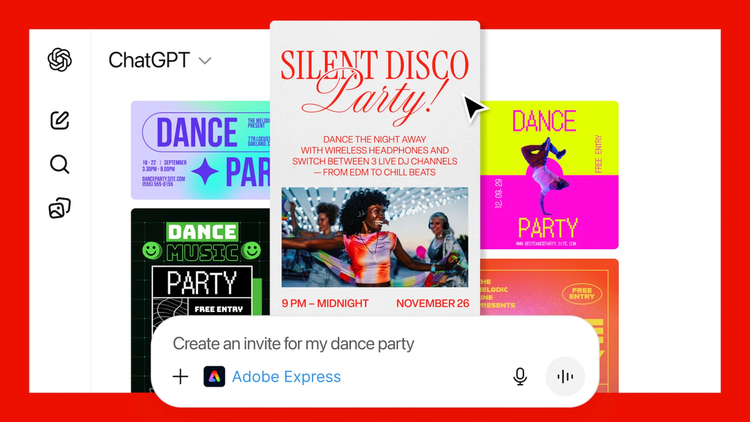
.

How to Create Marketing Assets with Adobe Express and ChatGPT.

Design and create marketing assets with ease with the Adobe Express ChatGPT marketing integration.

Start designing with Adobe Express

Free to useNo credit card required

How to Create Marketing Assets with Adobe Express and ChatGPT
Easy all-in-one editor
One-click edits from any device
Fast creation with generative AI
Thousands of professionally designed templates

Creating compelling marketing assets in today’s fast-paced digital landscape is vital to being heard above the noise. With so much to process and plan for, modern marketing workflows now often integrate AI tools for efficiency and creativity. Now, independent marketers can experience agency and in-house practices from their own desks.

Adobe Express can be used alongside tools such as ChatGPT to help generate ideas and support the creation of marketing assets, depending on your needs and input. In this guide, we explore ways these tools may be used together to support the creation of campaign visuals, ads, posters and other digital content.

What are marketing assets, and why are they important?

Marketing assets are essentially anything that helps you communicate your message to your audience. For example, they can include things like campaign visuals (so social media posts and website banners) to ads, posters, and other types of digital content.

All marketing assets play a crucial role in communicating brand messages, engaging your target audience and driving campaign success. They often work in tandem, rather than separately, each its own piece in a wider campaign. For example:

  • Social media ads might direct people towards your website, where banners and graphics help continue the conversion journey.
  • Email headers help catch readers’ attention and direct them towards the relevant stages, for example, specific product pages and timely deals.
  • Posters, while not digital, can still work alongside your online campaigns, tying in your brand image and message across in-person touchpoints.
Red Grunge Geometric Powerful Ticket Sale Instagram Ad
Edit this template
Orange Minimal Geometric Powerful Fashion Instagram Ad
Edit this template
Blue Vintage Simple Neutral Food Instagram Ad
Edit this template
Green Simple Minimal Neutral Coffee Instagram Ad
Edit this template

Designing impactful marketing visuals with Adobe Express in ChatGPT.

AI tools can help you generate drafts of marketing assets more efficiently, though results may vary and should be reviewed for consistency. This means your campaigns accurately reflect your brand image and message across all touchpoints, while streamlining your workflows. Using AI tools in Adobe Express, you can create marketing visuals and assets for a range of platforms, without the need for an agency-sized team behind you.

ChatGPT can help you brainstorm ideas or explore creative directions before refining your designs in Adobe Express and you can even prompt Adobe directly within the platform. Then, make them come to life using Adobe AI tools. The first step is understanding how to translate your ChatGPT-generated ideas into stunning designs. Here’s how to get started:

1. Choose the right template.

The first step is to choose or generate the right template for your visual. Browse thousands of free templates for social media ads, posters and more – or generate your own using the Adobe Express AI Template Generator. Just create a quick prompt and watch your idea come to life.

2. Generate your visuals.

Once you’ve got your foundations, it’s time to create your assets. You can use AI‑supported tools to generate draft text and visual ideas, which can then be refined in Adobe Express to build out your campaign materials. You can also get started with the Adobe Express AI Logo Generator so you can add consistent branding across marketing assets, or use the AI Poster Generator to get started with your print media.

3. Customise with your brand kit.

Build out your brand kit with your logo, branded visuals and colour palettes to use across all your assets. Create a comprehensive brand kit that you can use for all your campaigns, so you know your branding is consistent across all touchpoints.

4. Enhance your assets with effects and graphics.

Once you’re happy with your assets, you can add the finishing touches. Adobe Express offers a range of professional editing tools and effects you can experiment with. Use both AI-powered and manual features to help you create your perfect visuals.

5. Share across your platforms.

Adobe Express then makes it easy to finalise and share your creations across platforms. Download as different file types or even as live URLs to share with peers. Plus, all your designs are saved so you can come back and tweak whenever your campaign needs an update.

https://youtu.be/uouNjFuJ3QU?si=A0TTIC2fGDWSiski

Creating diverse digital content for marketing platforms with Adobe Express in ChatGPT.

With the marketing landscape becoming ever more competitive, it’s important that you’re able to adapt to changes in the industry and consumer behaviour. Each digital marketing asset you create has different requirements, so you’ll need to adapt your designs across various platforms and formats.

Not only this, but you’ll need to create responsive designs, meaning that assets need to adapt, resize and rearrange depending on the device and platform they’re being viewed on. A key way to do this is by following a mobile-first approach, ensuring that everything you create works well for mobile device visitors.

With this in mind, here are some quick tips for designing different marketing asset types:

Designing for social media.

  • Maintain brand consistency. Your ads will need to remain consistent across different platforms, whether on Instagram or Facebook.
  • Prioritise mobile-first. Most people will be accessing your social ads via mobile, so you’ll need to create your visuals with this in mind.
  • Understand visual contrast and hierarchy. Use contrasting colours for clarity, and structure your posts so the most important message is the most visible.

Crafting engaging digital ads.

  • Keep things simple. You have just a few seconds to get your message across to the viewer, so make sure things are clear so they know where to look.
  • Use strong calls-to-action. A CTA is vital to show prospective customers what their next steps should be.
  • Refine your copy. Though you may be tempted to get as much information as possible onto one ad, short, precise and readable copy is vital for engagement.

Producing effective email graphics.

  • Prioritise the key message. Use email headers and headings to showcase the standout message of the email. You don’t want to overload people with information and choice.
  • Utilise white space. You don’t want things to look bare, but using white space helps to make sure things aren’t cluttered and don’t overwhelm the reader.
  • Design with mobile in mind. Similar to social media, people tend to scroll through their emails on their phone. So make sure your tag lines are optimised and clickable.
Red & Yellow Burger Shop Food Business Promotion Instagram Ad
Edit this template
Pink and Yellow Fashion Sale Instagram Ad
Edit this template
Cream and Orange Food Promo Instagram Ad
Edit this template
Cream and Purple Fashion Sale Instagram Ad
Edit this template

Streamlining your marketing workflow: Why use ChatGPT AI for marketing asset creation?

As a student, you can use Adobe Express and Adobe tools within ChatGPT to streamline the creation of marketing assets. Generate your ideas, then bring them to life with further AI tools to perfect a streamlined workflow. The integration of both tools allows for rapid iteration, consistent branding and efficient content generation.

This combined approach can:

  • Save you time. Generate marketing assets and leave more time for other branded tasks like content creation or communications.
  • Reduce manual effort. Create more visuals with less effort, so you have energy leftover for managing your brand.
  • Help support the creation of a higher volume of quality assets, depending on project scope, review, and refinement. This approach may help streamline parts of your creative workflow, depending on your project and how you use the tools – all from the comfort of your own desk.
  • Maintain brand consistency. Support brand consistency by applying your brand kit across assets, while reviewing all content to ensure it meets your brand guidelines.
  • Allow you to seamlessly scale. Start small, then build out your brand with a variety of assets and visuals that suit all platforms and touchpoints.

How can Adobe Express and ChatGPT help students create marketing assets?

Adobe Express and ChatGPT can help students explore design ideas and create visually appealing marketing materials, depending on their input and project needs, bringing campaigns to life with AI-powered features. Experiment with a variety of professional templates and tools, without any need for previous design experience.

  1. 1. Design eye-catching campaign visuals from templates.

    Start from scratch or choose from Adobe Express’ wide library of marketing templates to create stunning assets and visuals. Whether you’re creating social media ads, website banners or email headers, there’s a template ready for you.

Supercharge your marketing asset creation with Adobe Express and ChatGPT integration.

Use Adobe Express directly within ChatGPT to generate ideas and create stunning marketing assets. By integrating both tools, you can fully streamline your creative workflows, providing the power of full agency teams at the touch of a button.

Generate digital assets like social media ads and banners and print assets like posters and flyers. Wherever your campaigns take you, together Adobe Express and ChatGPT offer all the tools you need to create consistent and effective marketing visuals.

Note: AI‑generated text and images may contain inaccuracies or inconsistencies. Review and edit all AI‑generated content to ensure accuracy, suitability, and compliance with your project requirements.

You might also like...

Good to know