72 Simple captions to capture the magic in everyday moments.
Think simple captions are just filler? Nope. Paired with scroll-stopping designs, they can hit harder than a long paragraph and make your post (or IRL project) stand out.
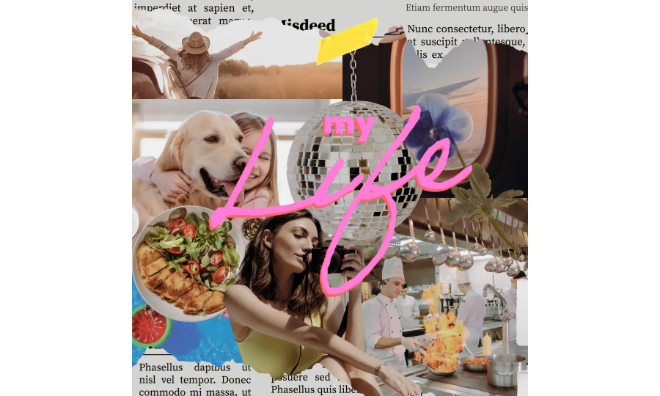




The best simple captions that’ll rake in the clicks.
Still trying to nail the perfect caption for a cute selfie? Or searching for a line that captures a fleeting moment just right? The truth is, you don’t need to write an entire chapter to get your point across. That’s exactly where these simple captions come in.
Whether you’re posting a quick selfie or sharing a snapshot from your travels, simple captions help keep your message sharp and memorable. They’re easy to read, easy to remember, and often more impactful than long paragraphs.
So, instead of overthinking about what to write, a short but clever caption can let your photo do the talking. In this guide, you’ll find examples and creative ways to pair your favorite simple captions with fresh design ideas.
And with the help of Adobe Express, you can transform even the simplest text into something visually striking, no design experience needed!
Simple captions to turn your ideas into scroll-stopping creative projects.
Sometimes the best caption is the one that doesn’t try too hard. Simple captions keep your posts grounded, letting the moment speak for itself.
With Adobe Express, you can give even the shortest lines a whole new dimension. Try pairing a simple caption with a poster remixed into an aesthetic mood board. Or animate your favorite simple captions into a digital “quote of the week” banner for your feed. You could even use the collage maker to layer your caption across a grid of photos, almost like a mini storybook.
Another fun idea is using the banner maker to create a caption-driven Insta carousel, where each swipe reveals a little more of your story. Outside of social, these simple captions can shine in personal newsletters or even quick (but heartfelt) notes where brevity makes the biggest impact.
recipe
Simple Instagram captions to make your posts shine.
What’s the easiest way to stand out on Instagram? Keep your post short and straight to the point. Simple Instagram captions help your visuals take the lead while still anchoring your story.
Here’s a quick tip: pair your simple Instagram caption with an anecdote. This is a great way to add context and make your post feel more genuine while keeping things relatively short.
These simple Instagram captions give your design a clean, polished look while still letting your photo shine. Want to push it further? Adobe Express makes it easy to turn a simple caption into a full carousel using customizable templates and one-click tools. Try adding your caption to a beautiful Reel cover design, or remix a photo collage template into a digital postcard series to share across your social media pages.
With a few quick edits, your “simple” captions can feel surprisingly elevated.
Want to drive engagement on Instagram? This Adobe Express guide shares helpful tips so you can design valuable content, use carousel posts to relay a ton of information (without overwhelming your audience), and more.
recipe
Cute simple captions that stick.
Ever land on a photo that just makes you smile? That’s when cute simple captions hit best. They’re short, cheerful, and instantly relatable.
With Adobe Express, you can channel that sweetness into projects that last longer than a post. For example, try making a mini zine spread with doodle graphics and pastel text overlays, or design an adorable countdown graphic with animated icons for an upcoming trip.
Try remixing a card template into a pocket-sized memory note or design a charming Insta carousel where each slide reveals an image, such as an original illustration, paired with a cute caption overlay. Add stickers, playful fonts, or even subtle animation effects to make your post and caption stand out.
Beyond social, these captions can brighten up scrapbook pages. They’re also great as locker decorations or printed journal covers filled with personal doodles.
Simple selfie captions that are oozing with personality.
Your selfie is already doing the heavy lifting. Now, all you need is a simple selfie caption to take it even further.
These simple selfie captions fit that role perfectly, and Adobe Express makes them even more versatile. Turn any caption into a comic-style flyer with expressive speech bubbles, filters, and animation. Or design a digital diary page by layering selfies into a letter template.
Then, experiment with image effects like filters, tones, or shadows, or tweak the opacity to create unique looks for each photo. View the image editing options by selecting the image you want to modify. Under the Image menu, you can choose from three different tabs: Edit, Effects, and Animation.
Beyond social media, these simple selfie captions can double as Zoom backgrounds, personal phone lock screens, or printed notes for your vision board.
How to create scroll-stopping simple captions.


Simple captions for girls who want to leave their mark.
A confident photo doesn’t need a long explanation. Simple captions for girls keep things effortless while still letting your personality shine.
Adobe Express gives you creative ways (and beginner-friendly tools) to extend these captions beyond social media. Design a dynamic digital banner that features your caption with cool texture overlays, or remix these captions into a vision board-style poster filled with inspiring images.
Try making a collage that shows what your life has been like lately. Using the collage maker, bring together photos that showcase your milestones and everyday moments. Then, add these simple captions as text overlays for context and to help you tell your story.
Because these captions are simple and short, they’re great for typographic posters. To create visual interest, combine different typefaces and weights (maximum of three). Combine contrasting colors and apply filters to create unique image effects. Add shapes, stickers, or hand-drawn illustrations to personalize your work. You can even make a series of posters to share as downloadable content for your followers.
Simple birthday captions to make any celebration magical.
Birthdays don’t always need long, sentimental messages. A simple birthday caption says it best and keeps the focus on the moment and, of course, the celebrant.
Adobe Express makes it easy to turn that quick caption into something memorable. Design a digital invite flyer with animated confetti effects, or compile photos from last year’s celebration and turn them into a printed gift. Add a sweet letter to make it extra special.
You could also try layering your caption into a thank-you card with photo stickers from the party, or make a carousel where each frame captures a different birthday moment. You can even create a digital scrapbook page to save your birthday memories beyond the timeline.
Aside from social media, these simple birthday captions shine on party signage, custom cake topper, or printed tags for goodie bags.
How to write simple captions that are far from ordinary.
Coming up with the perfect simple caption seems so…well, simple. But when you sit down to write, you might find yourself racking your brain for hours just to come up with ideas.
Take a deep breath. We’re here to help you out with some writing tips.
- Follow a formula. This helps streamline your process. For example, start with a hook, share your story or insights, then add a CTA. Remember to optimize your caption for search by incorporating relevant keywords and hashtags. You don’t always have to follow this formula. Experiment with different approaches and see what works best for you. You can even try mixing up your captions, like sprinkling humor into an informational post to make it more engaging.
- Try writing longer captions. Short and simple captions are great, but long captions can help drive engagement, according to a 2021 Hootsuite experiment. With longer captions, you have more room to share your expertise, be more authentic, discuss what’s going on in the photo, or dive deeper into topics that interest you.
- Prioritize authenticity. Write your simple captions like you’re talking to a friend or loved one. This can help make your posts more relatable and may even encourage your audience to engage with them.
- Always add context. Don’t just say “Check this out” and then hit publish. Add context, even a short one. For example, share a few details about what’s going on in the photo. Where was it taken? Was there a special occasion? What’s the story behind it? Context adds depth to your post, which can help your audience better connect with your content.
- Write like you’re talking to one person. This keeps your captions from sounding too general. Plus, because it feels more personal, this approach makes it easier for audiences to connect with your content. Remember, beyond giving them value, you need to give your followers a reason to care and actually listen to what you have to say.
Design tips to take your simple captions to the next level.
Now that you’ve got the captions, it’s time to pair them with designs that bring them to life. Here are a few ideas to get you started.
- Use a grid. Using a grid system will help you stay consistent with your spacing and margins.
- Apply graphic design principles. Incorporating principles like hierarchy and contrast, for example, can make your design more effective and functional, without compromising your creative vision.
- Prioritize readability. Make it easier for your audience to understand your message by using easy-to-read font styles (maximum of three) and experimenting with different weights.
- Use templates. Adobe Express offers thousands of remixable templates that you can fully customize in minutes using beginner-friendly tools.
- Create a cohesive look. Make your own design template and use that across digital or printed projects for a more consistent look. You can make tiny modifications to the template depending on the channel, so they’re slightly distinct from each other but still cohesive.
- Listen to your audience. Whether you’re writing or designing, it pays to listen to your audience and know what their real problems are. This helps you create tailored content that addresses specific problems.
You can also use simple captions to enhance visual content. For example, add them to reports or presentations to give context to images, graphs, or illustrations. Because they’re short and simple, they’re great for communicating key points clearly or for summarizing complex information.
Create like never before with Adobe Express.
Simple captions prove that less really can be more. With just a few words and the right design, you can make your posts or personal projects feel more intentional and polished.
The best part is that you don’t need to be a designer to pull it off. Adobe Express gives you ready-to-use templates, beginner-friendly editing tools, and an array of creative customization options to transform even the shortest captions into eye-catching, unforgettable works.
Start experimenting with your favorite simple captions today. See how Adobe Express can help you turn something simple into a powerful moment, online or in real life.