


How to make a spin wheel.

Make your own spin wheel with examples, templates and top tips from Adobe Express.

Start designing with Adobe Express

How to make a spin wheel
Easy all-in-one editor
One-click edits from any device
Fast creation with generative AI
Thousands of professionally designed templates
toc-title
Jump to this section:
toc-aria-label
table of contents links
content-1
What is a spin wheel?
content-1-short
content-2
What is a spin wheel used for?
content-2-short
content-3
How can Adobe Express help you make your own ‘spin the wheel’ game?
content-3-short
content-4
Benefits of a spin wheel.
content-4-short
content-5
Top tips when using a spinning wheel.
content-5-short
content-6
Spinning wheel examples.
content-6-short
content-7
Make a spin the wheel with AI Text Effects from Adobe Express.
content-7-short
Make a spin the wheel with AI Text Effects.

A spin wheel is the ultimate decision-making device. Also known as picker wheels or decision wheels, these interactive tools randomly select an option from a set of choices to determine a random outcome. You can create your own wheel and use it in a variety of scenarios, from personal decision-making to school games and workplace incentives.

Wondering how to make your own spin the wheel? In this guide, we’ll explore the key steps, tools and tips and tricks to get you started. Whether you want to boost engagement or provide an interactive sales experience, creating a spinning wheel is fast and fun with Adobe Express.

Key takeaways.

What is a spin wheel?

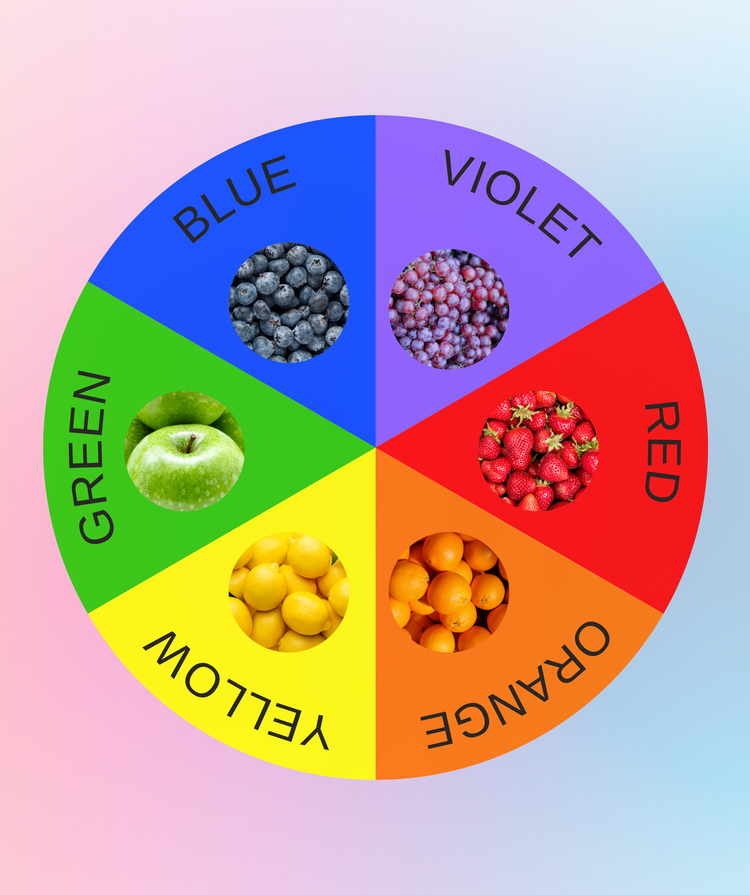
A spin wheel is a device that uses a spinning motion to randomly select an option from a set of choices. It features a circular wheel with segments that each represent a different option. Users input their choices and spin the wheel to get a random result.

Spinning wheels date back to ancient times, when Roman and Greek soldiers drew symbols on chariot wheels and guessed which one the wheel would stop at. This was later adapted for roulette, slot machines, and the prize wheels we know today.

A spin wheel can be physical or digital. A physical wheel relies on the user manually spinning the device, while a digital version operates online or via software – you just need to click a button to get it to spin. Both types of spinning wheel are completely random, and work on the same logic of chance.

What is a spin wheel used for?

Spin wheels add an element of excitement and anticipation to activities that require impartial decision-making. Digital spinning wheels, in particular, are popular for games, raffles, contests, prizes, and even problem-solving.

Marketing and gamification.

Businesses can use spin-the-wheel games to offer promotions, attract customers, and encourage purchases. Customisable spinning wheels can also be tailored to specific campaigns and target audiences, increasing engagement and brand recognition.

Education and presentations.

Spin wheels can add some interactivity in presentations, making information more digestible and memorable. In classrooms, they can be used for games, quizzes, and randomly selecting students for activities.

Decision-making and random selection.

A customisable spin wheel can make random selections for contests, raffles, or even for everyday activities. They offer a fun and transparent way to make choices – from games nights to dinner options.

How can Adobe Express help you make your own ‘spin the wheel’ game?

There’s no doubt that spinning wheels are a great marketing tool, and you can make your own in just a few simple steps with Adobe Express.

1. Create your spin wheel as the base.

Start a new project and use shapes and text tools to create your spin wheel and its segments. Don’t want to start from scratch? You can also use Adobe Express design assets from ready-made spinning wheels to get started.

2. Customise with Brand Kit colours and fonts.

Use the Adobe Express Brand Kit to match your spinning wheel to your fonts, colour palette, logo, and other key assets. Perfect for consistent messaging, brand recognition, and creating unique spin wheel designs.

3. Enhance your spin wheel with images.

Make a spin-the-wheel game even more exciting with accompanying images – from graphics to animations. With the image editor, you can edit using filters, enhancements, scaling and more.

4. Animate your spin wheel and share.

Select spinner speeds, sounds, and other components to make your spin wheel unique. Once complete, collaborate and share with your team, ready for use.

Benefits of a spin wheel.

Spin wheels offer a range of benefits in marketing. As well as being fun and accessible, they’re also easy to make and even easier to use – perfect for lead generation, engagement and retention.

Using a spinning wheel in your marketing campaign efforts can help you:

Top tips when using a spinning wheel.

Ready to make a spin-the-wheel part of your marketing campaign? Here are some key factors to consider before giving your audience the chance to spin to win:

Picture, Picture

Set a clear objective and goal.

Consider what you want to achieve with the campaign, and how your spinning wheel can help you achieve it. Are you aiming to boost social media engagement, drive website traffic, or increase sales? Your objective will determine the segments, design and more of your spinning wheel.

Define the target audience.

Once you understand your goals, you can determine your target audience. Consider who your campaign will be suitable for. This will depend on the prizes or what you’re looking to offer.

Set prizes for winners.

It’s crucial to choose prizes that will resonate with your target audience and align with your brand’s image. Consider offering a mix of low, medium, and high-value prizes to maximise engagement, from discounts and offers to free trials.

Ensure the experience is user-friendly.

Spin-the-wheel games are fun and exciting, but they should also be accessible and easy to use. Ensure the tool is user-friendly and simple to navigate. Take note that spin time can also affect the experience. Shorter spin times can hold attention, while longer spin times can build anticipation.

Monitor the metrics to track success.

Once your campaign is under way, you can check its performance through analytics. This should give you an insight into customer behaviour, how responsive people are to your campaigns, and which spin wheel prizes resonate with them most.

Spinning wheel examples.

Spinning wheels sound like fun and games – and they are. But how do they work in practice? When it comes to marketing, you can make a spin-the-wheel game that appeals to your audience and allows you to reap your rewards. Here are a few examples:

Turn anonymous visitors into paying customers.

Using a spinning prize wheel on your website can attract visitors and drive website traffic. For example, you can use them to promote discounts and offers for your products or services. Visitors will be enticed to spin to win, potentially boosting conversion rates and sales.

Reward loyalty with a spin-the-wheel prize for a cosmetics brand.

Spinning wheels are just as effective as rewards and loyalty tools. For cosmetics brands, reward existing customers with a spin wheel promotion that requires them to upload their proof of purchase. They can then spin the wheel for the chance to win a prize.

Entertain your audience by checking health and fitness.

A spinning wheel can go beyond discounts and rewards. You can make a spin-the-wheel that entertains your audience instead. For example, including exercises in each wheel segment to encourage a daily routine. This can build a community, grow your database, and keep your audience engaged.

Make a spin the wheel with AI Text Effects from Adobe Express.

Make your spin-the-wheel game pop with stunning text effects. Adobe Express’s AI Text Effect Generator can transform simple text into eye-catching visual designs in seconds.

All you need to do is type a description into the generator and watch it create stylised fonts that’ll take your spinning wheel to the next level.

Say goodbye to bland text and hello to fun fonts – from glittery gold to floral monogram letters. Save your new font and add it to your spin-the-wheel game for more creative flair.

You might also like...

View all