8 web page layout ideas to get your website up and running.
Start building your own website with these eight web page layout ideas from Adobe Express.
Start designing with Adobe Express
One-click edits from any device
Fast creation with generative AI
Thousands of professionally designed templates
toc-title
Table of contents:
toc-aria-label
table of contents links
content-1
What is a web page layout?
content-2
Why are web page design and layout so important?
content-3
8 Web page layout ideas
content-4
How to pick the perfect web page layout for your brand
content-4-short
How to pick the perfect web page layout
content-5
How to make the most of these web page layout ideas
content-5-short
How to make the most of these web page ideas
content-6
Free web page layout examples
content-7
How can Adobe Express help you build your own web page?
content-7-short
How can Adobe Express help you build a web page?
Creating a website is an important part of starting a new business, or freelancing. It’s an easy way to start building your online presence and give potential customers or clients a good first impression. a chance to learn more about your brand – or even shop your products.
When creating a website or online store, page layout is key. A well-built site doesn’t just look professional, but it functions intuitively, making it easier for users to engage with you and your offering.
Want to know how you can use Adobe Express to build your own web pages? Explore these simple web page layout ideas and learn how to customise them in just a few clicks.
What is a web page layout?
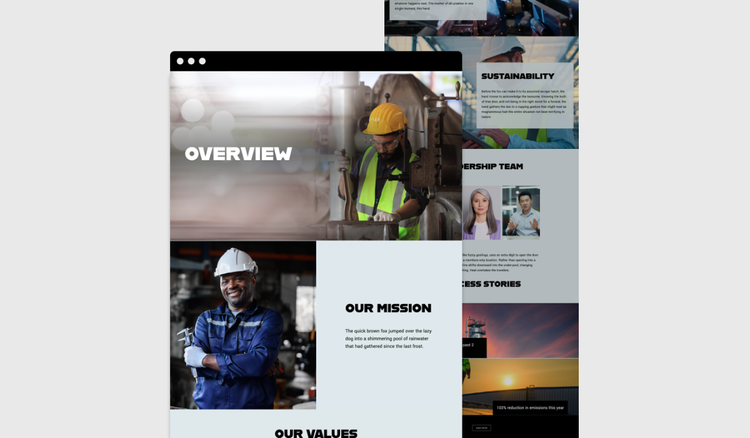
A web page layout is how you structure and arrange different components on a website landing page. It determines how your content is organised and how users interact with the page.
Your web page layout might be made up of headers, banners, imagery, navigation menus and key content sections – based on the page type and intent. After all, different web pages will require different layouts.
For example, you might use more commercially-focused components – like a benefits grid or CTA banner – on a product page compared to a blog article. Whereas, on a lead generation page, you might prioritise a form component higher up the page so it’s easy for customers to enter their details.
An effective web page design can ensure there’s consistency across the entire site and can help to create a clear and visually appealing page. It should grab your visitor’s attention and foster a user-friendly experience – something that’s essential whether you’re creating an ecommerce site, freelancer website or digital portfolio.
Why are web page design and layout so important?
Web page design and layout are important because they shape how users interact with your site. An effective layout is a chance to showcase your brand, and an opportunity to exhibit your reliability and trustworthiness. Here are some of the benefits of good web page design:
Reflects positively on your brand.
A professional site builds credibility, making your business seem dependable.
Makes it easy to navigate.
Increase the chances of people staying on your site by using an uncluttered, easy to understand web page layout, enabling them to find information quickly.
Enhances the user experience.
Ensure content is easily accessible and flows naturally, making it a more enjoyable and engaging experience for visitors.
Improves mobile responsiveness.
Adapt your web page design to cover different devices, such as computers, tablets, and smartphones.
Supports conversion goals.
Design commercial web pages with conversion in mind – strategic contact us forms, sign up points, and calls to action (CTAs) all push users towards your conversion goals.
8 Web page layout ideas.
Not sure where to start with your web page layout? No problem, we’ve got some ideas and inspiration to get the ball rolling.
1. Grid web page layout.
A grid layout uses rows and columns to organise content into clear sections, making it neat and organised. It’s a popular choice for ecommerce hub pages, portfolios, and blogs, where you might want to focus on imagery, links to other pages and supporting snippets of copy.
Keen photographer or stylist? It’s a good option for showcasing your shots, as grids scale well for responsive design too.
2. Split screen web page.
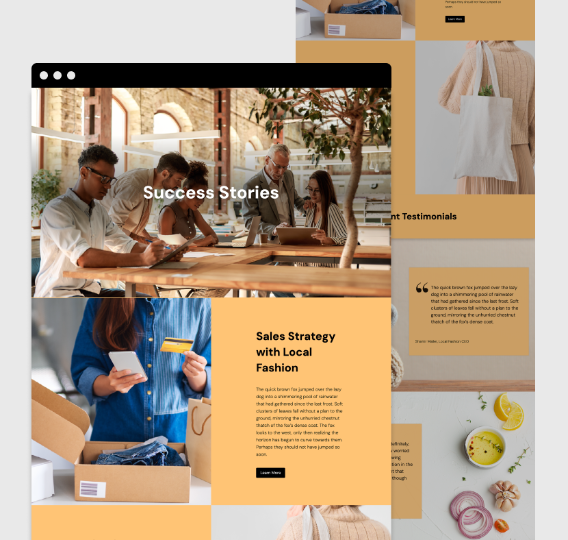
Split screen web pages divide the screen into two sections – perfect for modern web design in the creative sector. Let’s say there are two main elements you want to incorporate, such as a key brand asset and text on an “About us” page, or products and images for commercial pages, a split screen would let you show both.
3. Image-based web page.
This type of design uses
high quality images to create visual appeal, putting photos front and centre. It’s great for photographers, designers, and travel brands and is an effective way of telling the story of your brand through images.
4. Text-based web page.
A text-based web page layout emphasizes text over images, so it works best when communication or education is the priority. Got a long-form article or blog post to include on your website? You’ll want to use a text-based layout with a few images scattered throughout. It also works for business or industry news too – think an awards announcement, new client update or press release for an upcoming partnership.
5. Multi-column web page layout.
A multi-column web page layout design has two or more vertical content columns. It’s a great way to organise informational pieces, such as product specifications, or service lists. Magazines, professional services like lawyers, and technology firms might use this.
6. Portfolio web page layout.
A portfolio web page layout is a gallery-style format that allows professionals to display their work to prospective employers. Think freelancers in photography, graphic design, and other creative arts. You can even use Adobe Express to
build your own online portfolio.
7. F-Pattern Web Page Layout.
An F-Pattern web page layout is a structure that follows natural eye scanning patterns (top left to right, then down). It works on a variety of content, such as blogs, media sites, and landing pages. It’s a UX-friendly choice that engages users at all the right points.
8. Single-Page (Scrolling) Layout.
This design puts all the content on a single scrollable page and uses anchor links to help users navigate to different sections on the page. It’s simple, and allows for a continuous flow, ideal for small businesses and portfolios. Its emphasis is on simplicity, as supposed to over-cluttered designs.
How to pick the perfect web page layout for your brand.
It’s not random, there needs to be some thinking behind your web page design. One that fits your business and target audience. Some things to keep in mind are:
Goals.
Decide what your aim is. Is the purpose of your website to sell, inform, or entertain?
Ease.
Does your design need to be simple, or would a more complex layout pay off?
Getting around.
What navigation is required, and is the information easy to find?
Imagery.
How can you capture attention with high quality images? Are they the focus or a supporting feature?
Structure.
What is your content hierarchy, and how can you structure the web page to align with this?
Usability.
How can you ensure the website is usable and accessible for all?
Whitespace.
Do you need to strategically place blank space to create ‘breathing room’ and improve readability?
How to make the most of these web page layout ideas.
Find your favourite.
Choose your favourite idea from our list or pick a few if it's hard to decide.
Start exploring.
Open Adobe Express and start exploring. Go straight to templates if you know what you want to make. Otherwise simply browse for inspiration and start a new project.
Experiment and have fun.
Play with the colour themes, fonts, graphics and images. Upload your own photos or use some of ours – the choice is yours.
Bring your web page layout idea to life.
Add a personal touch to make the design your own. Try a photo filter or an image crop; add animation or a soundtrack – the possibilities are endless.
Save and share.
Download your files for printing or share to your socials directly from the app.
Free web page layout examples.
How can Adobe Express help you build your own web page?
Ready to create a website with a fantastic layout? You can do so for free with Adobe Express.
1. Use the free website maker to create your page layout.
Stuck for ideas on how to get started? Browse thousands of web templates and use the
online website maker to build your site from scratch. There’s no need for technical know-how – simply drag and drop your images, text and assets into your preferred layout and edit the colours, fonts, and structure until you’re happy with the result.
2. Edit imagery for your web page.
Using an image-based web page layout? Make sure your imagery is at its best. Simply upload your images, and edit, resize, and apply filters with the
image editor. It’s great for creating website assets that strike a chord with your audience.
3. Add your own logo and brand assets to your web page design.
Personalise your website with your own
logo and brand assets. Upload them to Adobe Express and apply your brand’s fonts and colours for a recognisable and professional design.
Launch your website with the help of AI-generated templates from Adobe Express.
Finished building your website? Make use of the AI template generator to craft your own flyers, banners and social media posts to announce the launch of your website.
Enter your text prompts and the tool will generate a range of ideas in moments. Edit and add your branding, then you’re ready to share with customers in the countdown to your website launch.
Try Adobe Express for free now
What are the four main parts of a web page?
A webpage layout typically includes a header (logo), main content area, sidebar (navigation), and footer (contact information). These sections give structure to your content, improving website navigation and user experience.
What does HTML stand for?
HTML stands for Hypertext Markup Language. It’s the standard coding language for creating and structuring web content. It defines elements like headings, paragraphs, links, and images, enabling browsers to display websites correctly.
Is Adobe Express free?
Yes, our free plan offers many core features including thousands of templates, photo editing and effects, animation, and 5GB of storage. See our
pricing page for details and to compare plans.
The quick and easy create-anything app.
Make stunning social posts, images, videos, flyers, and more with Adobe Express. Dream it. Make it. Easy.
Get started for free