File must be JPEG(JPG), PNG, or WEBP and up to 100MB.
By uploading your image or video, you agree to the Adobe Terms of Use and Privacy Policy and confirm you are 18 years of age or older.
File size larger than 100MB
Unable to process the request
We are unable to process this file type. Please try again.
Only one file can be uploaded at a time.
Image is smaller than the minimum dimensions (512 x 512 pixels). Please resize and try again.
cgen
promoid=QTV3NS2W&mv=other
style
Dark, static links
Anyone can remove an object from a photo online.
Whether you’re a professional photographer cleaning up a photo for a client, a designer perfecting images for a marketing campaign, or a creator editing for social media, you can clean up images for free with just a few clicks and simple text prompts with Generative Remove.
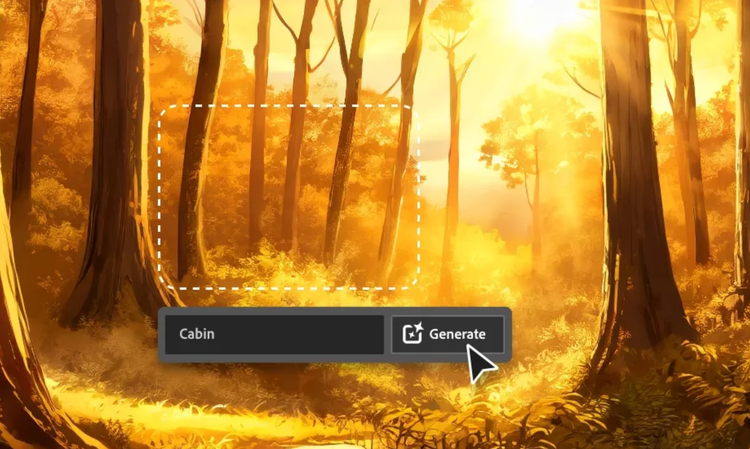
From unsightly trash cans to inconvenient tourists, you can use AI to remove any object from a photo. With Generative Remove, all you have to do is paint the object with the brush and click Generate. The object will disappear and background will be filled in so it looks natural.
Delete distractions using the AI object remover in Firefly.
Eliminate anything that pulls focus away from your subject. Easily get rid of power lines, wires, street signs, and more. Perfecting images for editorial projects or just to share with friends on social is simple with Generative Remove.
Remove text from a photo.
Keep random logos, watermarks, or stray text from ruining an otherwise perfect photo. Brush away unwanted text in seconds with Generative Remove, all while preserving the details that make your image authentic. Edits blend smoothly into the background, so there’s no compromise on quality.
Remove objects to restore the old and improve the new.
Take out dust, scratches, or reflections from old family photos, or tidy up a product photo to make it look polished for ecommerce, social media, or print.
How to remove an object from a photo in Firefly photo editor.
Log in to Adobe Firefly with your Adobe ID or create a free account if you don’t have one. Open the Firefly image editor by clicking the Edit an Image button.
In the Image module, you can either choose a previously generated image from the Generate tab, or click the Edit tab to upload your own images.
Brush over the area or object you want to remove. Use the toolbar to adjust brush size and hardness. Generative Remove will identify unwanted objects inside the area, leaving the rest of your image untouched.
Click Generate and watch Firefly remove the unwanted object in seconds. Firefly automatically fills in the area with natural, context‑aware results, keeping your visuals true to your creative intent.
Once you’re satisfied with your creation, you can download it, copy it to your clipboard, or share it directly with others. Turn your AI-edited photo into eye-catching social posts, videos, flyers, and more.
Why use Firefly creative AI to remove an object from a photo?
Generative Remove in Firefly image editor uses artificial intelligence to quickly remove any unwanted object in seconds. Firefly automatically fills in the area with natural-looking results, keeping visuals clean, polished, and true to their creative intent. Adobe Firefly is a strong choice for users to remove objects from photos because it offers the following advantages:
With Generative Remove in Firefly, you can remove photobombers, crowds, and other distracting people from busy backgrounds. Also, get rid of unsightly objects in landscape settings like signage, trash cans, and wires. Into food photography? Take out spills, stains, and other distractions so all that’s left is the perfect shot.
Firefly generative AI models are commercially safe. The Adobe Firefly generative AI models were trained on licensed content, such as Adobe Stock, and public domain content where copyright has expired. For partner models, you are responsible for determining whether the model is appropriate for your project.
The best remove object AI tools helps creators go from prompt to polished image fast, without sacrificing creative control. Adobe Firefly and Adobe partner models make this easy with intuitive features like our object removal brush and prompt-to-image tools.
Using Firefly Generative Remove, you can easily select and erase an unwanted person in seconds. Firefly automatically erases the person and fills in the area with natural, context-aware results, keeping your visuals clean, polished, and true to your creative intent.
You can easily remove text from a photo by selecting the text with the object removal brush and clicking Generate. Firefly automatically erases the text and fills in the area with natural, context-aware results, keeping your visuals clean, polished, and true to your creative intent.
An AI photo eraser erases objects from images and fills in the area with natural, context-aware results, keeping your visuals clean, polished, and true to your creative intent.
The best way to remove objects from an image in Firefly is to go to the Firefly image editor, choose Generative Remove from the Quick Actions Menu, select the unwanted object with the brush tool, and click Generate. Firefly will immediately erase the object and fill in the space with context-aware results.
No, you do not need any design skills to remove an object in a photo in Firefly. Generative Remove makes it easy — just select an object with the brush tool and click Generate.
Yes, you can use the Adobe Firefly remove object feature for free with an Adobe account. If you have a free account, you’ll get free daily generations to erase unwanted elements from images using AI-powered tools. Learn more about using Adobe Firefly for free. Upgrade to a paid plan for higher-volume use and access to additional features.

Share this page
style
xxxl spacing bottom
Explore more Firefly tools.
style
Show-4-desktop, s spacing top, xxl spacing bottom
background
#F0F0F7
Adobe Firefly
The next evolution of creative AI is here for all your ideas, with image, video, audio, and vector tools.
You can control how Adobe websites use cookies and similar technologies by making choices below. But note that if you disable cookies and similar technologies entirely, Adobe websites may not function properly.
Cookies are small text files stored by your web browser when you use websites. There are also other technologies that can be used for similar purposes like HTML5 Local Storage and local shared objects, web beacons, and embedded scripts. These technologies help us do things like remembering you and your preferences when you return to our sites, measure how you use the website, conduct market research, and gather information about the ads you see and interact with.
You can make choices in the menu below about what cookies and other technologies you want us to use on Adobe sites when you visit them from this browser. You can always change those choices later by clicking on the Cookie Preferences link at the bottom of the page.
If enabled:
We can improve your experience by tailoring the site and the content to things we think might be of interest
We can better keep track of your preferences — like what language you prefer to use
We will better understand your likely interests so we can provide you more relevant Adobe ads and content on non-Adobe websites and in non-Adobe apps
It will help us improve the performance of our website and those of our partners who use the Adobe Experience Cloud
If disabled:
We won’t be able to remember you from session to session so the experience may not be tailored to your interests
You’ll still have access to the content of the site but certain features that depend on cookies may not function
You’ll still see ads, they just may not be as relevant to you
General information
You can control how Adobe websites use cookies and similar technologies by making choices below. But note that if you disable cookies and similar technologies entirely, Adobe websites may not function properly.
Cookies are small text files stored by your web browser when you use websites. There are also other technologies that can be used for similar purposes like HTML5 Local Storage, web beacons, and embedded scripts. These technologies help us do things like remembering you and your preferences when you return to our sites, measure how you use the website, conduct market research, and gather information about the ads you see and interact with.
You can make choices in the menu below about what cookies and other technologies you want us to use on Adobe sites when you visit them from this browser. You can always change those choices later by clicking on the Cookie Preferences link at the bottom of the page.
If enabled:
We can improve your experience by tailoring the site and the content to things we think might be of interest
We can better keep track of your preferences — like what language you prefer to use
We will better understand your likely interests so we can provide you more relevant Adobe ads and content on non-Adobe websites and in non-Adobe apps
It will help us improve the performance of our website and those of our partners who use the Adobe Experience Cloud
If disabled:
We won’t be able to remember you from session to session so the experience may not be tailored to your interests
We’ll still count your use of our site and services
You’ll still have access to the content of the site but certain features that depend on cookies may not function
You’ll still see ads, they just may not be as relevant to you
Operate the site and core servicesOperate site and measure engagement
Always active
These cookies are required, and they are used to enable the site and related services core functionality. Without them the site could not operate, so they cannot be disabled.
These cookies enable the site and related services’ core functionality and collect statistics about user engagement, such as counting active use to help us understand trends. These cookies cannot be disabled.
Measure performance
These cookies are used to analyze site usage to measure and improve performance. Without them Adobe cannot know what content is most valued and how often unique visitors return to the site, making it hard to improve information we offer to you.
These cookies are used to analyze site usage to measure and improve performance. Without them Adobe cannot know what content is most valued, making it hard to improve information we offer to you.
Extend functionality
These cookies are used to enhance the functionality of Adobe sites such as remembering your settings and preferences to deliver a personalized experience; for example, your username, your repeated visits, preferred language, your country, or any other saved preference.
Personalize advertising
These cookies are used to enable Adobe and our partners to serve ads more relevant to your interests. Without them you will still see ads, but they might not be as relevant to you.