


Featured
Put everything in focus with Pixelated Gaze
Get to know the Pixelated Gaze microtrend in Adobe Express.

Adobe Express
11/17/2026
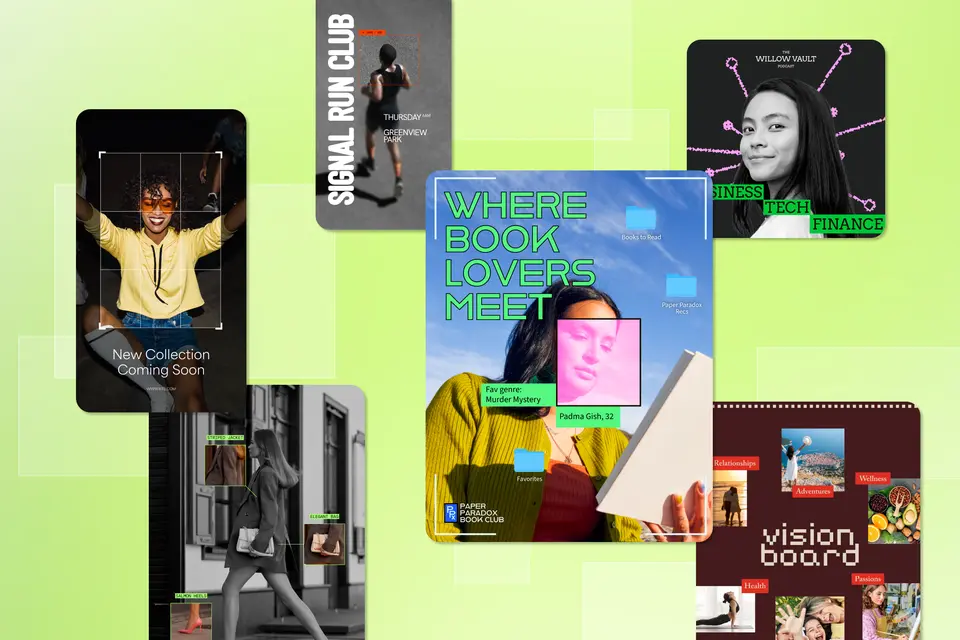
Picture a candid photograph taken from a distance. Your eye is drawn to a single detail: a frame within a frame, a burst of color against the black-and-white image, pulling your attention to exactly where you should focus.
That experience defines Pixelated Gaze, one of the 2026 Adobe design trends that is rooted in observation and surveillance. This trend uses contrast, cropping, and camera-like framing to direct focus with precision. It guides the viewer’s gaze to deliberate, detail-driven visual cues.
Whether you’re breaking down a product or spotlighting a fashion piece, Pixelated Gaze lets you inform and reveal — making the viewer feel like they’re not just passively looking, but understanding the elements on a deeper level.
Key takeaways
- Instead of trying to catch the eye all at once, Pixelated Gaze isolates a single detail through framing and cropping, giving audiences a reason to stop and study rather than scroll past.
- This observational, screen-born style suits fashion, product design, architecture, and more — anywhere a brand wants to highlight craftsmanship or specifics.
- The most effective examples commit to one point of interest and use contrast to make it unmissable, rather than layering in multiple competing details. Simplicity elsewhere is what gives the spotlighted moment its power.
Pixelated Gaze, explained
Some design styles keep the viewer at arm’s length. Pixelated Gaze breaks that trend and draws people close enough to study things that otherwise may go unnoticed. This style borrows from candid photography, security footage, and interface design to build a visual centered on looking, noticing, and picking apart detail.
Cropping and framing do a lot of work here — a small box or outline lifted from a larger image, a callout pointing to one specific area, or a photo cropped tight enough to feel like a screenshot signals exactly where the viewer’s attention should land. Rather than spreading information evenly across a layout, Pixelated Gaze concentrates it, creating moments of clarity within a busier whole.

Contrast is an important feature of this design trend. Black-and-white photography paired with a single spot of color, sharp lighting against darker backgrounds, or a crisp subject set against a blurred or muted environment isolates what matters most and moves everything else into the background. The effect can feel almost like evidence laid out for inspection.
Typography is often inspired by digital or technical sources — monospace fonts, interface-style labels, and other text options that look like data rather than decoration. Type exists to support the focus of the imagery, not distract from it.
Pixelated Gaze can easily be adjusted to be more over-the-top or minimal, making it a versatile style that fits across various industries. Fashion brands can use it to showcase the details of a new collection. Automotive and architecture brands can call out technical specs or design elements. The one place this trend calls for restraint is anywhere it might tip into literal surveillance imagery — security and certain tech applications should proceed with caution since the trend’s watchful nature can stray from intriguing and informative if pushed too far.
At its core, Pixelated Gaze is about earning trust through scrutiny — showing an audience enough detail that they feel informed by the image in front of them.
Why the observant nature of Pixelated Gaze matters right now
2025 Adobe design trend Press Start proved that audiences are drawn to visuals full of tech-forward elements — pixel type, interface cues, and a sense of looking through a lens rather than a staged photo. Pixelated Gaze picks up that same gravitation toward digital interfaces, but trades Press Start’s high-energy nostalgia for something quieter and more deliberate: a single element, isolated and framed, asking to be studied rather than admired.
Many modern designs are full of motion and color, competing for your attention. Pixelated Gaze breaks this pattern entirely. People notice the difference, and the more focused approach that this design trend offers builds trust with viewers.
Creating this style starts with naming one thing you want someone to notice, then shaping everything else around that focal point. A design doesn’t need noise to hold attention — it needs a reason for viewers to look twice.
How to capture a Pixelated Gaze design
Pixelated Gaze begins with a single question: What do you want the viewer to notice first? Before choosing color or typography, decide on one focal point your entire composition will be centered around. This could be a product feature, a specific gesture, or a small but important detail.
From there, pick your framing device. You could add a thin outline around a cropped section, layer a small photo over a wider shot, or draw a box around one part of the frame. These techniques lead your viewer to the main focus of the piece.
Adding contrast will carry this type of design. Highlighting color in an otherwise black-and-white image, or letting sharp elements sit against a softer, blurred background, creates visual tension that puts detail front and center. A clothing brand could isolate the fluffy texture of a faux fur jacket, or a car dealership could zoom in on the leather seats of a new vehicle.
What keeps a Pixelated Gaze design from feeling cold or clinical is restraint elsewhere in the layout. The background can stay quiet, the palette can stay simple, and the typography can stay out of the way, so the one moment you’ve chosen to spotlight has room to actually land.
Pixelated Gaze in action
Pixelated Gaze shines whenever it comes to the specifics, elements that deserve to be analyzed rather than just admired. Product breakdowns, before-and-after shots, feature callouts, portfolio highlights, and more can benefit from a zoomed-in lens.
When creating your first piece, resist the urge to stack focal points on top of each other since the trend loses its power the moment everything is competing for attention. Choose the segment you want to spotlight, and let the rest of the design step back and support it. Pixelated Gaze doesn’t just show your audience a product or idea — it shows them you took the time to look closely first.


