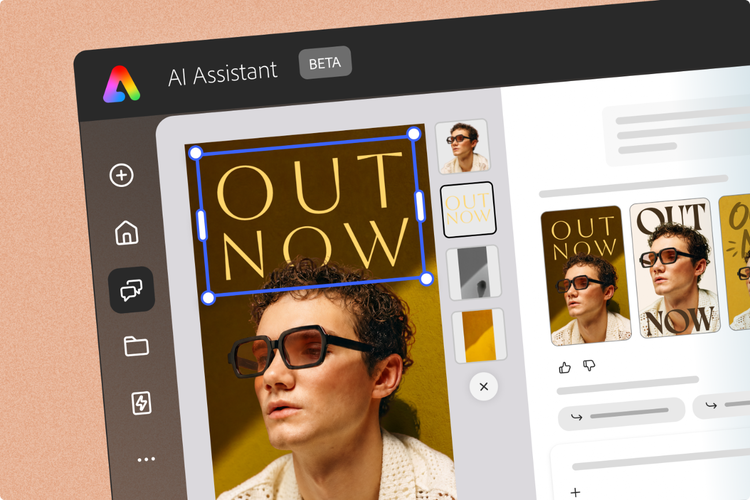
Start with a prompt, then edit to make it yours
Create on brand with checks and controls
Create where you already work
Scale on-brand content across your organization
Bring creativity to every classroom
Creating on-brand content just got a major upgrade. At Adobe MAX 2026, we introduced powerful new ways to go from prompt to polished design with AI Assistant (beta). Conversational editing, on-brand generative design, Brand Check (beta), and more, mean you can create and refine designs faster while keeping every detail editable, so the result is unmistakably yours. Also, Adobe Express now works in more of the tools you already use. Turn insights from a PDF into a flyer directly inside Acrobat, find and edit templates inside Claude or ChatGPT, or export your designs as .PSD files to keep working in Photoshop and an .IDML files (beta) for InDesign. Here’s what’s new.
Key takeaways
- Go from idea to editable design with AI Assistant (beta). Now available directly on Adobe Express Home, AI Assistant helps you brainstorm, create, and refine designs through simple conversation, so you can get to your vision faster.
- Stay on brand from the first prompt to the final design. Quickly build a brand kit by extracting fonts, colors, and even guidelines from a PDF or image. Reference your brand kit at any time in the AI Assistant prompt bar and publish with confidence using Brand Check (beta) to catch and fix inconsistencies.
- Create without breaking your workflow. Adobe Express works with Claude, ChatGPT, Microsoft Copilot, Gemini, Acrobat, or users can take designs further with new export capabilities to InDesign and Photoshop.

Start with a prompt, then edit to make it yours
AI Assistant (beta) is now embedded on Home so you can get to your vision faster. Ask it to brainstorm ideas for a product launch, suggest a layout for a menu, or even get design advice to get unstuck faster. Every output remains fully editable, so you can manually swap a photo, rewrite a headline, or tweak colors in the Adobe Express editor. AI Assistant (beta) can also handle tedious tasks, like resizing a design or updating all the text on a page in seconds, so you can spend more time adding your unique touch.
While the AI Assistant helps increase your productivity, other new AI-powered features are also designed to save you time and get from idea to draft faster. These include:
- Updates to Generate Presentation – Get a head start on strategy slides from a prompt, a doc, or a web link. Use a conversational interface to craft your narrative, then easily generate a first draft with engaging layouts that you can co-edit with teammates and/or clients to stay aligned on tight deadlines.
- Highlight Reel Maker – Upload photos, videos, and an audio track, choose a length and style, and get a reel with cuts timed to the beat.
- Generate Webpage (beta) – Turn an idea, images, or documents into a polished webpage, then keep prompting to make it your own. Get inspired with presets for landing pages, portfolios, presentations, announcements, reports, and more.
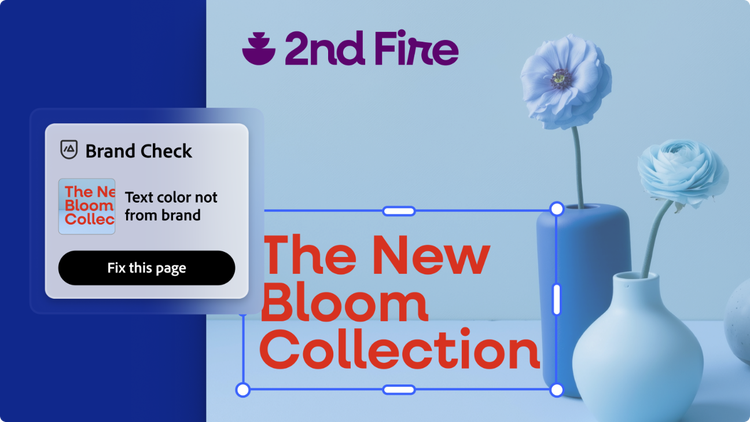
Create on brand with checks and controls
Adobe Express makes it easier than ever to create on-brand assets and ensure your final output stays consistent with your brand standards. Genpact, an Adobe Platinum Solution partner, turned its refreshed logo, typography, color, and layout rules into Express templates that social, events, and communications teams can use right away.
When a team is making social posts, otherwise small drifts start to add up — a slightly different green, an old logo, an unapproved font. All of this can be caught early with these tools:
- Extract Brand (beta) – Build your brand kit in a fraction of the time. Upload a PDF or images to extract and save your brand voice, logos, fonts, colors, and creative standards.
- On-brand generation and editing – Reference your brand kit directly in the AI Assistant prompt bar so the results use your fonts, colors, and guidelines to ensure outputs follow your brand’s look, feel, and standards for visual consistency.
- Brand Check (beta): In one click, find and fix brand inconsistencies across your design, so you can share or publish with confidence.
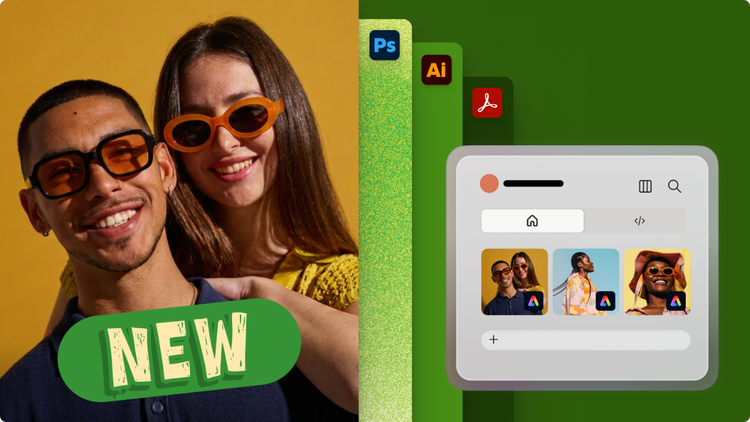
Create where you already work
Your workflow is critical to your success — the more you can do without adding extra steps, the better. Adobe Express fits into the tools you already use, so you don’t have to switch apps to make a design.
- AI assistants – Adobe Express is now available in Claude, ChatGPT, Microsoft Copilot, and Gemini through the Adobe creativity connector. Find and customize Adobe Express templates, edit text and images directly in chat, and campaign content without interrupting your workflow. When you’re ready to take your design further, seamlessly continue editing in Adobe Express.
- More of the tools you use every day – Adobe Express is showing up in the places where you collaborate, play, and connect. For consumers, Adobe Express capabilities are integrated into the surfaces you’re already in, from creating team logos in EA Sports to remixing personalized game recaps on MLB.com. For businesses, we’re powering creativity within your surfaces and enhancing your business, like designing posters and business cards with FedEx, right where your customers order.
- Creative Cloud and Adobe – Adobe Express now works even more seamlessly across Creative Cloud and Acrobat. Create content directly in Acrobat AI Assistant to quickly turn document insights into flyers, newsletters, and more. You can also export Express designs as .PSD and .IDML files or send a file from InDesign straight into Adobe Express.
Creation doesn’t have to stop just because you’re on the go. Adobe Express is available on web, desktop, and mobile. It’s also included in Creative Cloud Pro, Acrobat Express, Acrobat Studio, and Adobe Firefly Pro plans at no additional cost.

Scale on-brand content across your organization
Enterprises continue to trust Adobe Express to scale on-brand content across the organization. Adobe Express also works across the Adobe products teams already rely on, including Creative Cloud, Adobe Experience Manager, and Adobe Workfront, and now Adobe Acrobat. Here’s how leading enterprises are using it:
- Lumen: Locked templates and brand kits let marketing teams make their own assets, with Workfront approvals built in, so no more “rogue creative.” With Adobe Firefly Custom Models in Adobe Express, production time dropped by an average of 90%, and brand familiarity grew 44% year over year.
- Workday: A brand-curated template library and Adobe Express in the hands of over 90% of marketers freed up creative bandwidth and cut costs by at least 50%.
- Red Hat: Designers build templates in Creative Cloud, and marketers localize them in Adobe Express across 100+ markets, turning weeks of edits into minutes.
- Serta Simmons Bedding: Self-service Express templates for retail partners grew customized, retailer-ready assets 10x.

Bring creativity to every classroom
Adobe Express helps educators save time creating fun, standards-aligned lessons and activities while giving students new ways to demonstrate what they know. Highlights include:
- Plan engaging lessons with Generate Activity –- Create curriculum-aligned activities from a prompt, with ready-to-customize templates and student instructions.
- Bring learning to life with Comic Creator – Help students demonstrate understanding through visual storytelling, from book reports to historical events and reflections. Comic Creator gives students creative control over all visuals and dialogue to create a comic that is truly their own.
- Turn ideas into stories with Animated Video Maker – Create engaging, animated videos with ease. This experience helps students explain concepts and express their creativity in a quick, seamless way.
- Showcase student creativity with Galleries – Amplify student and educator ideas, creations, and photos in a collaborative gallery, with seamless, safe commenting.