All-new AI Assistant and more takeaways from Adobe MAX 2025

5 exciting takeaways announced at Adobe MAX, including the all-new AI Assistant Today marks a new era for Adobe Express with the launch of the all-new AI Assistant (limited beta). Plus, the quick and easy create-anything app just got better with hundreds of feature improvements and productivity updates, seamless cross-app workflows, smoother brand setup, and more.

5 key updates to Adobe Express

  1. All-new AI Assistant (beta)
  2. User-driven enhancements
  3. On brand, every time
  4. Great ads made easy
  5. Everywhere you create

All-new AI Assistant (beta)

Watch the video

Prompt. Edit. Whoa.

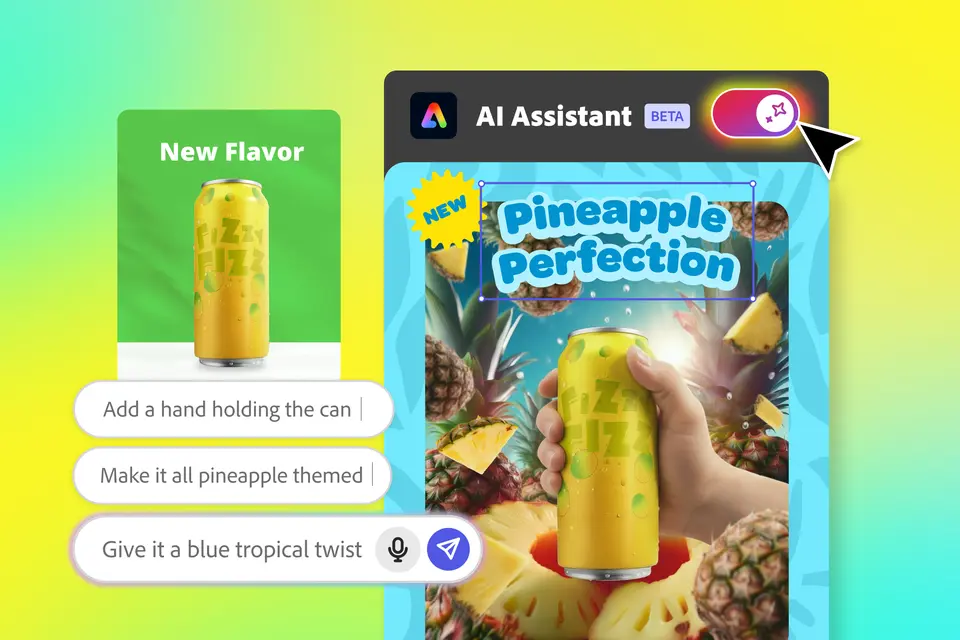
Creators, creative pros, and business users alike can make sweeping changes to a design or image in just a prompt, all while keeping the parts they love intact. Plus, AI Assistant still allows users to make any manual edits, providing ultimate control and control over how you create. “Our vision to bring creativity to all is more real than ever with Adobe Express AI Assistant — helping everyone create and design better, faster, every step of the way,” says Ian Wang, VP of Product at Adobe Express. “It unites the best of the old and the new — the intuitiveness of prompting and generative AI with the flexibility and power of full editing control when you need it. No more trade-offs, just creation without limits.”

Here’s what you can expect with AI Assistant:

  1. A faster way to create. Start with an idea, make sweeping edits to copy, color schemes and elements, animate and even resize — all in just a few prompts.
  2. Prompt anything, edit everything. Go beyond one-off generations with layered editing that keeps the parts you love intact.
  3. Next-level image editing. Experience the next level of photo editing with functionality powered by Adobe Firefly and third-party models such as Google Gemini’s 2.5 Flash. Turn an average portrait into a striking pose, swap out a lemon for a glass of lemonade, or remove distractions to make every shot look like it was the best take.
  4. Get unstuck faster. Keep creativity flowing and get unstuck faster with smart prompt suggestions that adapt to your design.
  5. Flexible by design. Use Assistant on your terms. Choose to toggle Assistant on/off anytime and switch seamlessly between AI prompting and hands-on editing.

Let’s shape the future of content creation together! Limited beta availability: Adobe Express Premium, Desktop and English (US) only.

The next era of Adobe Express is here

Watch the video

You asked, we listened. With hundreds of user feedback-driven features and a streamlined new experience, Adobe Express has never been better. According to Wang, “Our goal has always been simple: to build the fastest, easiest, most intuitive app for content creation — and our community is what makes that mission meaningful. We've remained focused on listening deeply to our users. From usability studies to our online forums, those insights have shaped hundreds of product improvements this year, all designed to make workflows smoother and creation more seamless.”

You’ll find productivity updates that make navigation easier, streamlined cross-app workflows, and accelerated performance, as well as a general sense of easier and better performance. Here are some highlights:

1. Improve your efficiency with simplified usability and smooth navigation.

2. Create social content quicker and more easily with reduced guesswork on layouts, @mentioning, additional options for publishing and exporting (Instagram Stories and Facebook Reels), and more.

3. Stand out more with new features like animations, more stickers, improved text effects, and generated images using Clio 4 model.

4. Have greater creative control with bulk video editing, full timeline visibility, smarter remove background, and a more focused image editor.

On-brand, every time

Maintaining end-to-end brand consistency across teams is important to creators, creative pros, and business users alike — and it’s at the heart of Adobe Express. Your content can be on-brand all the time with lockable and shareable templates that can be edited and updated for everyone. Try jumpstarting any project with professionally made templates, then invite your team to edit, share, and co-create in Adobe Express. Now, you can:

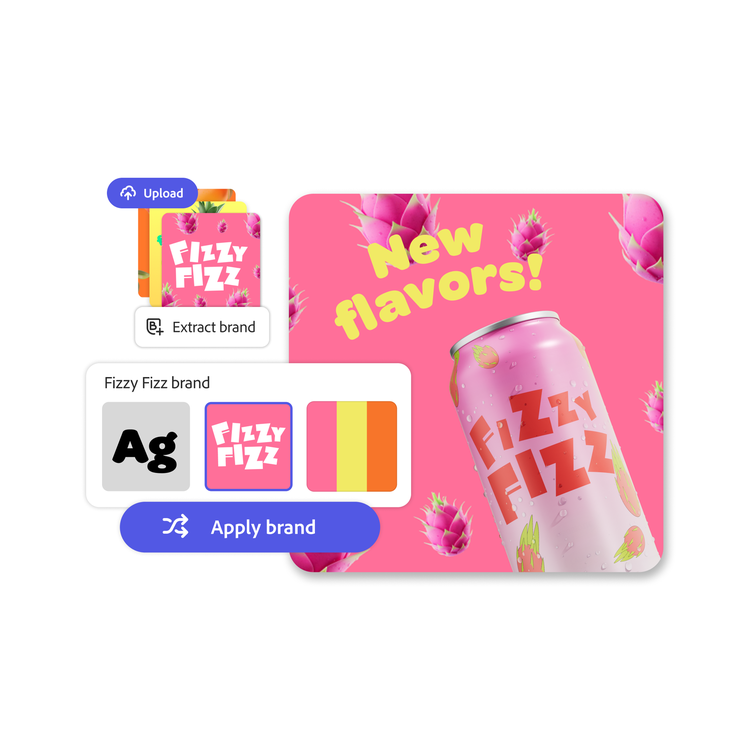
1. Accelerate brand setup. In just one click, set up a brand kit by automatically extracting logos, colors, and fonts from existing content.

2. Keep teams or clients aligned and create a consistent look and feel with template locking, review and approval workflows, and asset management in projects (including linking brands across multiple projects).

3. Update published templates without having to create new versions of the templates from scratch.

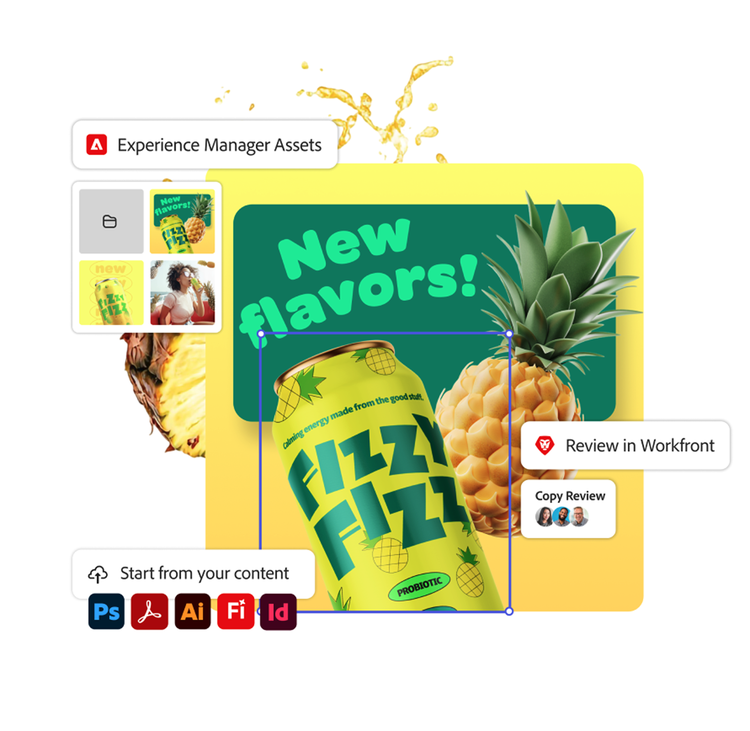
4. Use dynamic linking between assets in Photoshop and Illustrator and Adobe Express and seamless InDesign exporting to Express, so your team can stay connected everywhere they create.

5. Connect creative and marketing teams across all Adobe tools by integrating workflows with Adobe Workfront to unify approvals across your organization and give teams easy access to the latest assets stored in Adobe Experience Manager.

Great ads made easy

Creating standout ads has never been easier. Design high-performing ads for Amazon, Google, TikTok, LinkedIn, and more, then publish directly to each platform, all from one app. With smart design checks, safe zones, and simple drag-and-drop tools, you'll move faster, stay on-brand, and scale your campaigns to reach more customers.

  1. Easy-to-use drag-and-drop design tools make content creation fast and simple — no design expertise required.
  2. Direct imports and exports with major ad platforms let you move seamlessly between content creation and publishing without app-switching.
  3. Guided workflows and ready-to-use templates help you create faster and scale across platforms without starting from scratch.
  4. Built-in safe zones and design checks catch layout or format errors before you publish, so your ads don't get rejected.
  5. Real-time analytics help you track performance and make smarter, data-driven decisions on the fly.

Here are a few specific improvements you may notice:

Works with Adobe Photoshop, Adobe Firefly, and more

Keep every piece of content in sync — you can design, edit, share, and create branded content from your favorite Adobe tools and workflows. There are seamless workflows across Creative Cloud, Firefly, and Acrobat Studio. Easily access your approved brand assets, and quickly review and approve designs — all from the Adobe Express app.

Adobe Express works where you are — Firefly, Photoshop, Illustrator, Acrobat, GenStudio, AEM, Workfront, and more. It’s embedded in Creative Cloud and Firefly channels and messages — so you can send Firefly images and board ideas to Express for finalizing design and publishing to social.

Here are a few specific improvements you may notice:

Adobe Express is even easier to use and makes creation quicker than ever. Try the new AI Assistant (beta) and all the other new features in Adobe Express!

As a reminder, Adobe Express is available for free. For additional features and access to AI Assistant (beta), upgrade to a Premium plan. Adobe Express Premium is included in Creative Cloud Pro, Firefly Pro, and Adobe Studio.

Try Adobe Express today