



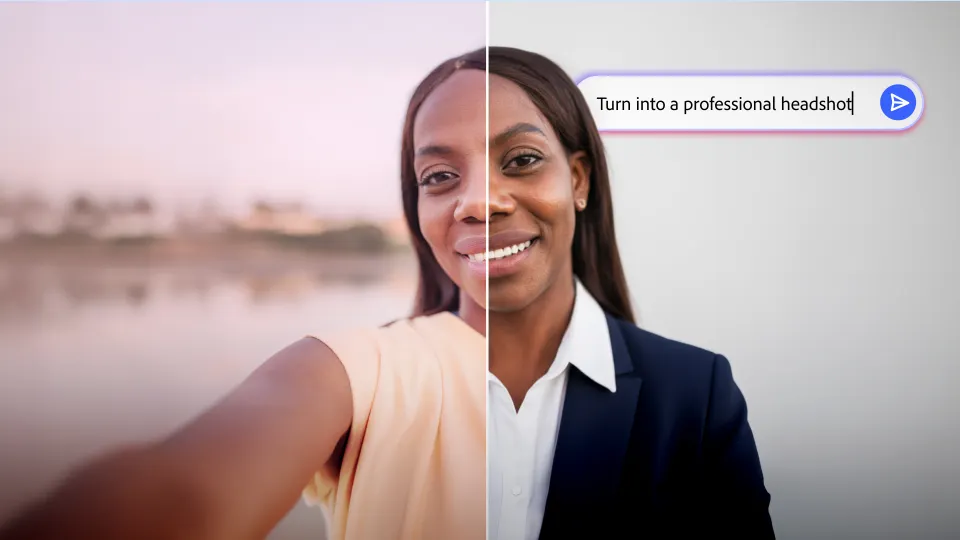
Turn selfies into professional headshots, product photos into studio-quality visuals, and everyday images into polished content – no design skills needed. Adobe Express Photos is currently available on Windows.
You've probably looked at a photo and immediately known something wasn't quite right but knowing how to fix it isn't always so easy. Maybe the background is distracting, the lighting is too dark, or the colors look dull — the challenge isn’t spotting the problem, it’s knowing how to fix it. Unless you’re a professional photo editor, this gap between knowing something’s off and knowing how to fix it quickly may be so large that you simply give up.
Whether you’re updating your LinkedIn profile picture, preparing product images for a campaign, or creating content for social media, getting professional-looking results can feel like a lot of work. Adobe Express Photos AI Assistant makes photo editing simple. Just describe what you want in plain language and watch as AI updates your photo.
How do I edit photos with AI?
Adobe Express Photos makes it easy to perform quick AI edits to your photo. With one-click edits, you don’t even have to write a prompt or scroll through filters. In one click, you can:
- Remove distractions: Remove backgrounds, clutter, and unwanted objects from your images.
- Product photos: Turn ordinary product images into clean, studio-quality visuals ready for e-commerce listings and campaigns.
- Professional headshots: Transform casual selfies or office photos into a polished, professional headshots without a photoshoot.
- Gradient backgrounds: Add a smooth, consistent gradient background perfect for social posts, ads, and cover images.
To get started, open Adobe Express Photos and explore AI Assistant suggestions on the home screen. Or, when you open an image, you’ll also find quick AI edits in the Effects panel.
How to edit photos with AI prompts
When you want to edit more specifically, you can turn to the prompt bar. Simply type a description of exactly how you want to edit your image or start with the suggested prompts above the prompt bar to get started. Some prompts to try:
- “Change the background color to white.”
- “Turn this photo into a caricature.”
- “Improve the lighting in this photo.”
- “Make colors more vibrant.”
- “Remove background distractions and add a soft shadow.”
Here, AI makes targeted changes while preserving the parts of the image you want to keep.
AI photo editing use cases for work and personal projects
From everyday photos to professional projects, AI Assistant helps people create polished visuals faster. Here are some of the most common ways people are using it today:
- Everyday users: Improve vacation photos, family pictures, and everyday snapshots for Instagram, TikTok, or sharing with friends and family without advanced editing skills.
- Professionals: Generate studio-quality AI headshots from any photo. In one edit, update your LinkedIn profile photo, email profile, and internal directories.
- Marketing teams: Turn event photos, campaign assets, and product images into polished visuals ready for social media, email, and web content.
- HR & people ops: Standardize team photos and company event images for internal directories, org charts, and employer brand pages to ensure consistent photo quality across the company.
Benefits of AI photo editing
Express Photos AI Assistant helps bridge the gap between the photo you have and the photo you want. Simply describe your vision, and AI makes targeted edits while preserving the parts of the image you love. The result is a polished photo without needing a design degree, a photography studio, or spending hours on trial and error.


