
.

Design

Why Atkinson Hyperlegible may be the best font for readers with low vision or dyslexia

Adobe Express logo

Adobe Express

06/17/2026

Summary

When readability is the goal, Atkinson Hyperlegible is worth a look. Developed by the Braille Institute, this font was specifically designed to make letters and numbers easier to distinguish at a glance, which can be especially helpful for readers with low vision, dyslexia, or reading fatigue.

This article offers a light overview of what makes Atkinson Hyperlegible stand out, how the font evolved over time, and why its exaggerated shapes and clear spacing can improve readability for many kinds of readers. It also touches on a few simple ways Adobe Express can help when creating more accessible reading materials.

Key takeaways

What is Atkinson Hyperlegible?

Atkinson Hyperlegible is a sans serif typeface created by the Braille Institute to improve legibility for people with low vision. Its design focuses on making each character look more distinct, rather than making the whole font feel stylistically uniform. That means some letters are intentionally more exaggerated than what you might see in conventional body fonts, because the goal is recognition first.

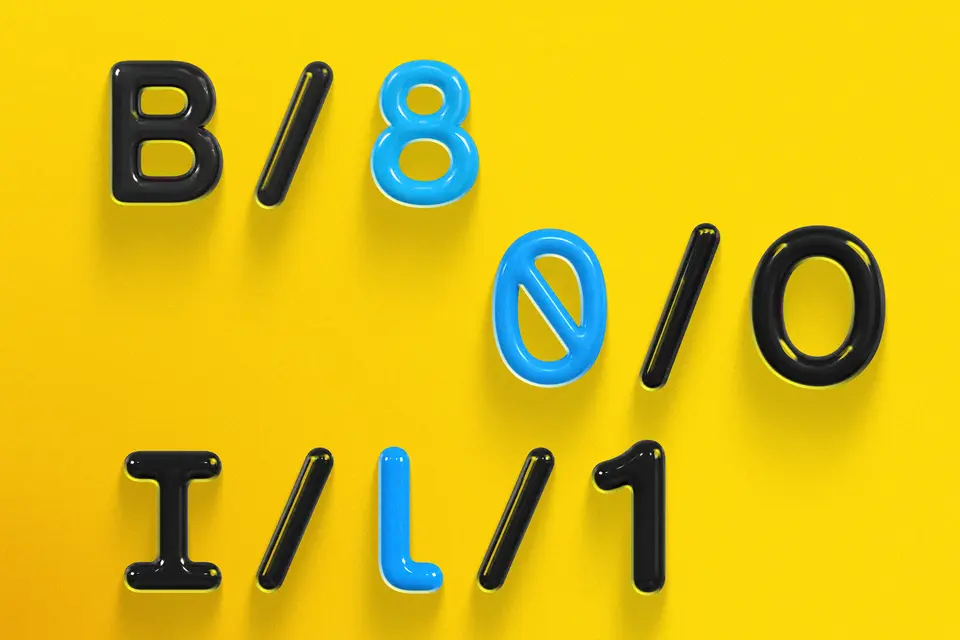
On the Braille Institute’s own font page, you can see the logic clearly: Ambiguous pairs such as B/8, O/0, and 1/I/l receive extra differentiation, while counters, tails, and angles are adjusted so characters don’t collapse into one another visually. This is the core reason the font is so often recommended when accessibility matters.

Why educators, creators, and publishers may want this font

If you design reading materials for a mixed audience, readability has to work across more than one kind of reader. Some people need support because of low vision. Others lose focus when text is dense, small, or visually crowded. Others simply read for long periods and benefit from cleaner forms that reduce friction.

That is where Atkinson Hyperlegible becomes useful beyond a narrow accessibility niche. Its clear spacing and obvious letter differences can make handouts, guides, worksheets, slides, and digital reading materials feel less taxing. Even readers without a diagnosed visual or processing issue may find it easier to stay oriented when the text is visually decisive instead of subtly ambiguous.

For people building those materials, Adobe Express can help carry that readability into finished content. You can start with templates, keep font choices consistent across formats, and turn the same visual system into classroom posters, practice sheets, or simple reading graphics without rebuilding everything from scratch.

What is the behind-the-scenes story of how this font evolved?

One of the most compelling things about Atkinson Hyperlegible is that it didn’t arrive as a generic “accessible” font label. It was built with a specific mission: Increase legibility for readers with low vision. The Braille Institute introduced the first version in 2019, naming it after founder J. Robert Atkinson. That original release later won Fast Company’s Innovation by Design recognition, and the font was added to the Cooper Hewitt, Smithsonian Design Museum’s permanent collection in 2024.

Then the project kept moving. In 2025, the Institute launched Atkinson Hyperlegible Next, which expanded support from 27 languages to more than 150 and increased the number of weights from two to seven. It also introduced variable and monospaced versions. In other words, the font evolved from a focused accessibility solution into a more flexible design family that could serve everyday reading, educational publishing, and digital interfaces more broadly.

What are the features that make Atkinson Hyperlegible so readable?

Use this quick checklist:

  • Character recognition. Choose Atkinson Hyperlegible when you need similar characters to be easier to distinguish at a glance.
  • Reader sensibilities. Use it for materials where letters like I, l, and i need to stay clearly separated.
  • Clarity at a glance. Apply it when number-letter confusion could be a problem, such as with pairs like O and 0.
  • Regulate size. Keep text at a comfortable size so the font’s open counters and distinct shapes remain visible.
  • Uncluttered formatting. Pair it with clean layouts and generous spacing to support fast recognition.
  • Support challenged readers. Use it for readers who may benefit from reduced visual confusion, including people with low vision, reading fatigue, or crowded text conditions.
  • Consider your application. Take advantage of newer versions when you need more weights, broader language support, or added design flexibility.
  • Review before distribution. Test the font in the exact format you plan to use, including print, slides, worksheets, or digital reading materials.
  • Regular usage wins. Use it consistently across materials so readers get the benefit of repeated exposure to the same clear letterforms.

How can you use Atkinson Hyperlegible?

Here are 7 essential steps

Step 1: Choose it when distinction matters most

If your material includes directions, early reading practice, high-stakes information, or long passages, pick a font that reduces visual guesswork. Atkinson Hyperlegible is strongest when the reader needs to tell characters apart quickly and confidently.

Step 2: Use comfortable sizing and spacing

A good accessibility font still needs breathing room. Avoid shrinking text too far or packing lines tightly. Let the font’s clarity work with the layout, not against it.

Step 3: Keep contrast high

Even a strong font loses power when light gray text sits on a white background. Pair Atkinson Hyperlegible with high contrast and uncluttered layouts.

Step 4: Use it consistently across materials

If students or readers move between worksheets, slides, and handouts, a consistent type system helps them stay oriented. Adobe Express worksheet tools can help you build those materials in a repeatable way.

Step 5: Build around accessibility, not after it

Readable fonts work best when the whole design supports them. Keep headings clear, sections separated, and visual clutter low. Adobe also offers general inclusive design guidance that pairs well with accessible typography choices.

Step 6: Export in reader-friendly formats

If you're sharing digital materials, clean PDFs matter. Adobe Express now supports PDF export with accessibility tags, which can help preserve structure when documents are distributed digitally.

Step 7: Test with real readers

The best font is the one that helps your audience. Print a page, view it on a screen, and test it with a few readers before standardizing it.

Atkinson Hyperlegible best practices

  • Prioritize distinction over style.
  • Use strong contrast and generous spacing.
  • Keep layouts simple and predictable.
  • Apply the font consistently across formats.
  • Pair it with accessible PDF and classroom workflows when sharing digitally.

Quick Atkinson Hyperlegible checklist

✅ Choose Atkinson Hyperlegible when character distinction matters most
✅ Use comfortable font sizes and generous line spacing
✅ Keep contrast high between text and background
✅ Avoid crowded layouts that make letters harder to separate
✅ Apply the font consistently across worksheets, slides, and handouts
✅ Export reader-friendly PDFs and screen-ready materials
✅ Test the final design with real readers on print and digital formats

Atkinson Hyperlegible stands out because it was designed with a clear purpose: Help people read more easily by making letters easier to recognize. That focus on character distinction, combined with its evolving family of styles, makes it one of the strongest font choices for accessible reading materials today.

Try Adobe Express today