File must be JPEG(JPG), PNG, or WEBP and up to 100MB.
By uploading your image or video, you agree to the Adobe Terms of Use and Privacy Policy and confirm you are 18 years of age or older.
File size larger than 100MB
Unable to process the request
We are unable to process this file type. Please try again.
Only one file can be uploaded at a time.
Image is smaller than the minimum dimensions (512 x 512 pixels). Please resize and try again.
cgen
&ff_source=adobe-com&ff_campaign=ai-photo-editor
style
Dark, static links
Smart photo editing tools powered by AI.
Experience faster, more intelligent editing with the Prompt to Edit AI photo editor. Powered by generative AI, Firefly simplifies image enhancement — from auto-retouching and color correction to object removal and replacement.
Get polished results in moments with the AI photo editor in Adobe Firefly, then take your photos even further with Firefly AI image editor capabilities. Tools like Image-to-Image and Scene-to-Image help you reimagine composition, lighting, and mood — perfect for exploring creative directions or refining a final look. Use Generative Match to align colors and tones with reference images, ensuring photo consistency across a series or campaign. Firefly AI makes professional-quality image enhancement fast and intuitive.
AI photo editing tools for creators, marketers, and everyday users.
Whether you're making social posts or product shots, Firefly AI image editor adapts to your needs. Use the slider tool Precision Flow to explore a range of variations and fine-tune your results — the slider shows the full gradient from low to high, letting you choose any point in between. Whether you're creating branded content or saving travel memories, Firefly brings precision and simplicity together in one powerful AI image editor.
How to edit photos using the Adobe Firefly AI photo editor.
To get started, log in to Adobe Firefly with your Adobe ID or create a free account if you don’t have one. Browse features and Quick Actions to edit your photo or open the Prompt to Edit feature directly in Adobe Firefly.
In the Image module, you can either choose a previously generated image from the Generate tab, or click the Edit tab to upload your own images.
Select an image generator model from the dropdown menu in the prompt field. You can choose the Adobe Firefly image model, or partner models from Google, OpenAI, and more.
Type a clear description of what you’d like to change directly into the prompt field. Start with at least five words for the best results, for example, “remove the power lines from the sky” or “add warm sunlight and a soft glow.” You can include specific keywords like “vintage look,” “realistic lighting,” or “studio background” to guide the AI photo editor toward your desired style.
Click Generate and wait as Adobe Firefly edits your image in seconds.
Refine your image by tweaking the prompt or adjusting the settings for a fresh result. Use one of the additional AI photo editor features in Adobe Firefly like Generative Remove, Generative Expand, or Generative Upscale to expand your creativity.
Once you’re satisfied with your creation, you can download it, copy it to your clipboard, or share it directly with others. Turn your AI-edited photo into eye-catching social posts, videos, flyers, and more.
From marketing assets and product shots to social content and artistic compositions, Firefly is an online AI photo editor that lets you experiment, refine, and produce professional-quality images with powerful, intuitive AI photo editing.
Firefly combines creative expertise with advanced generative AI to deliver stunning, high-quality images you can trust for personal and commercial projects.
Smarter creative workflow
Use natural-language prompts to enhance photos, remove distractions, or generate entirely new visuals in just a few clicks.
Flexible AI models
Choose between Firefly models for commercially safe, brand-ready results trained on licensed Adobe and public domain content, or explore partner models from Google, OpenAI, Runway, and more for faster style experimentation.
Creative control made simple
Fine-tune your image from lighting and composition to tone and texture with Prompt to Edit, Generative Fill, Generative Recolor, Replace Background, and one-click Quick Actions like crop or resize for instant polish.
style
two up, s spacing top, l spacing bottom, show-2-desktop
An AI photo editor uses artificial intelligence to simplify image editing and enhancement. With Adobe Firefly, you can upload or generate an image, then use intuitive prompts to remove objects, adjust lighting, change backgrounds, or refine color and composition easily.
The best AI photo editor enables users to quickly and easily make major transformations and quick edits, such as replacing a background or retouching the fine details of an image, with high-quality results. The Adobe Firefly AI photo editor is a strong choice for achieving such results without sacrificing creative control.
The Adobe Firefly AI image editor is built for everyone, so you can make professional-quality edits using simple text prompts without advanced photo editing skills.
Adobe Firefly works seamlessly across devices, so you can create and edit on desktop, mobile, or tablet, whether you’re using Mac, Windows, iOS, or Android. Start refining images on your laptop, then switch to your phone or tablet to keep editing on the go.
Projects sync automatically through Adobe Creative Cloud, making it easy to collaborate with teammates or clients and maintain a consistent workflow across platforms. Adobe Firefly also supports style transfers and other creative effects, so you can match looks or themes between devices without losing quality or context.
With Adobe Firefly, you can:
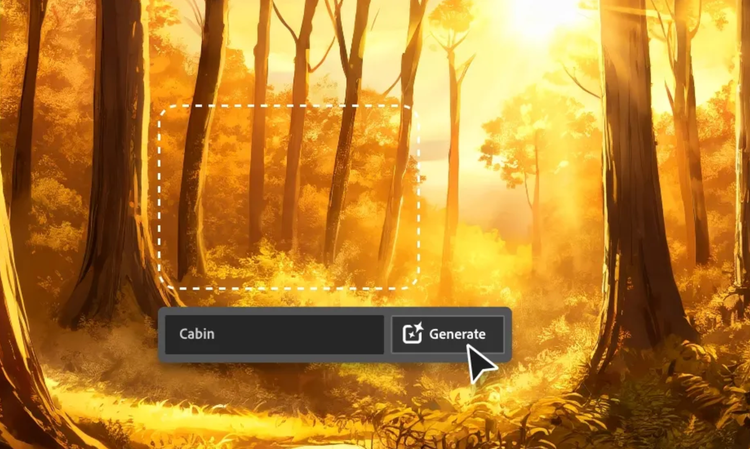
Use Prompt to Edit to add, remove, or replace objects and backgrounds by typing a text prompt of what you want to change.
Clean up images with Generative Remove to remove unwanted elements.
Extend backgrounds to multiple aspect ratios and sizes by using Generative Expand.
Increase resolution and image clarity using Generative Upscale.
Select and indicate specific parts of an image you want to change with the Markup tool.
Transform photos into new styles or moods using image-to-image editing.
The AI photo editor gives you flexible tools to enhance, reimagine, and perfect any image.
Adobe Firefly is built for realism and professional-grade quality. Its models are trained on licensed content to produce commercially safe, natural-looking edits that blend seamlessly into your images.
Adobe Firefly is ideal for beginners thanks to its easy-to-use interface and simple text-based editing. You can start creating right away, experiment freely, and refine results without advanced photo editing experience.
Yes, you can use the AI photo editor feature in Adobe Firefly for free. If you have a free account, you’ll get free daily generations to try the Adobe Firefly AI photo editor. Learn more about using Adobe Firefly for free. A paid plan is available for higher-volume generation.
Adobe Firefly generative AI models are commercially safe. The Adobe Firefly generative AI models were trained on licensed content, such as Adobe Stock, and public domain content where copyright has expired. For partner models, you are responsible for determining whether the model is appropriate for your project.
Adobe does not train and has never trained Adobe Firefly on user content. Adobe Firefly models are trained on a dataset of licensed content, such as Adobe Stock, and public domain content where copyright has expired. Adobe Stock content is covered under a separate license agreement, and Adobe compensates contributors for the use of that content.
Adobe Firefly stores your generated content and prompt history in your account’s Generation History, so you can review and reuse your past work. Your content is kept private and is never used to train AI models. You can also manage and delete items from your history.
Adobe Firefly offers a range of models, including its own commercially safe Adobe Firefly models. Users can also select from partner models from Google, OpenAI, Runway, and more. Learn more about partner models here.
Adobe Firefly is available across desktop and mobile on web browsers like Chrome, Microsoft Edge, Firefox, and Safari.
Users can upload JPEG (JPG), PNG, or WebP files up to 100MB to the AI Image Editor.
Share this page
style
xxl spacing bottom, xl-spacing-top,
Explore more Firefly tools.
style
Show-4-desktop, s spacing top, xxl spacing bottom
background
#F0F0F7
Adobe Firefly
Use everyday language to create extraordinary results with generative AI.
You can control how Adobe websites use cookies and similar technologies by making choices below. But note that if you disable cookies and similar technologies entirely, Adobe websites may not function properly.
Cookies are small text files stored by your web browser when you use websites. There are also other technologies that can be used for similar purposes like HTML5 Local Storage and local shared objects, web beacons, and embedded scripts. These technologies help us do things like remembering you and your preferences when you return to our sites, measure how you use the website, conduct market research, and gather information about the ads you see and interact with.
You can make choices in the menu below about what cookies and other technologies you want us to use on Adobe sites when you visit them from this browser. You can always change those choices later by clicking on the Cookie Preferences link at the bottom of the page.
If enabled:
We can improve your experience by tailoring the site and the content to things we think might be of interest
We can better keep track of your preferences — like what language you prefer to use
We will better understand your likely interests so we can provide you more relevant Adobe ads and content on non-Adobe websites and in non-Adobe apps
It will help us improve the performance of our website and those of our partners who use the Adobe Experience Cloud
If disabled:
We won’t be able to remember you from session to session so the experience may not be tailored to your interests
You’ll still have access to the content of the site but certain features that depend on cookies may not function
You’ll still see ads, they just may not be as relevant to you
General information
You can control how Adobe websites use cookies and similar technologies by making choices below. But note that if you disable cookies and similar technologies entirely, Adobe websites may not function properly.
Cookies are small text files stored by your web browser when you use websites. There are also other technologies that can be used for similar purposes like HTML5 Local Storage, web beacons, and embedded scripts. These technologies help us do things like remembering you and your preferences when you return to our sites, measure how you use the website, conduct market research, and gather information about the ads you see and interact with.
You can make choices in the menu below about what cookies and other technologies you want us to use on Adobe sites when you visit them from this browser. You can always change those choices later by clicking on the Cookie Preferences link at the bottom of the page.
If enabled:
We can improve your experience by tailoring the site and the content to things we think might be of interest
We can better keep track of your preferences — like what language you prefer to use
We will better understand your likely interests so we can provide you more relevant Adobe ads and content on non-Adobe websites and in non-Adobe apps
It will help us improve the performance of our website and those of our partners who use the Adobe Experience Cloud
If disabled:
We won’t be able to remember you from session to session so the experience may not be tailored to your interests
We’ll still count your use of our site and services
You’ll still have access to the content of the site but certain features that depend on cookies may not function
You’ll still see ads, they just may not be as relevant to you
Operate the site and core servicesOperate site and measure engagement
Always active
These cookies are required, and they are used to enable the site and related services core functionality. Without them the site could not operate, so they cannot be disabled.
These cookies enable the site and related services’ core functionality and collect statistics about user engagement, such as counting active use to help us understand trends. These cookies cannot be disabled.
Measure performance
These cookies are used to analyze site usage to measure and improve performance. Without them Adobe cannot know what content is most valued and how often unique visitors return to the site, making it hard to improve information we offer to you.
These cookies are used to analyze site usage to measure and improve performance. Without them Adobe cannot know what content is most valued, making it hard to improve information we offer to you.
Extend functionality
These cookies are used to enhance the functionality of Adobe sites such as remembering your settings and preferences to deliver a personalized experience; for example, your username, your repeated visits, preferred language, your country, or any other saved preference.
Personalize advertising
These cookies are used to enable Adobe and our partners to serve ads more relevant to your interests. Without them you will still see ads, but they might not be as relevant to you.