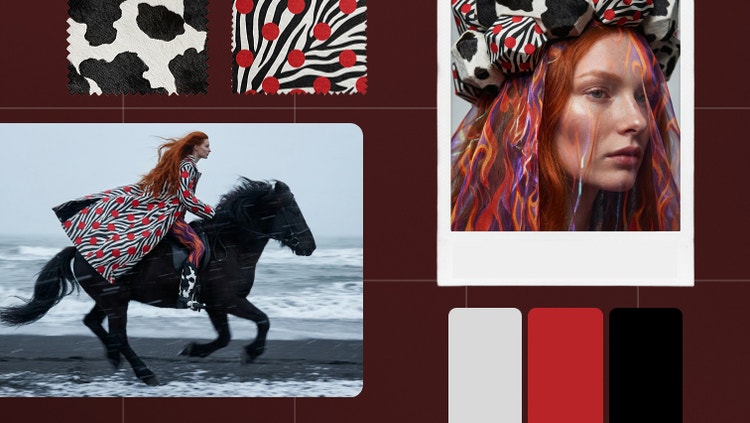
A mood board is a visual layout that combines images, colors, text, and textures to express a creative concept or design direction. It helps clarify ideas and sets the tone for fashion, branding, interior design projects, and more.
Firefly Boards is one of the best tools to create a mood board quickly and creatively. It combines templates, stock assets, and generative AI in a seamless online experience.
A mood board generator is for anyone exploring visual ideas — designers, marketers, stylists, decorators, and creatives of all kinds. It’s especially helpful when you need to move fast and stay inspired.
Yes, you can use the Adobe Firefly mood board maker for free with an Adobe account. Start with existing templates or use free daily generations to create AI content from text prompts and reference images. Learn more about
using Adobe Firefly for free. Upgrade to a paid plan for higher-volume generations and access to additional creative features."
Firefly Boards (Beta) helps you streamline the creative process, making it easier to visualize, refine, and present your ideas with a generative-first approach to mood boarding. It allows you to quickly explore various artistic directions, blend images, transform parts of an asset, and remix styles, backgrounds, and other elements.
Firefly Boards uses generative AI to support your creative flow. The mood board maker can generate new visuals, remix existing ones, and apply different styles or compositions — helping you explore and refine your ideas more effectively.
To create a mood board online, gather images, text, and color swatches matching your concept. Then, use Firefly Boards to import assets, generate new content, and design your layout using artboards, text, and AI-powered tools.
- Remix multiple images: Select multiple images from the canvas and click on the remix button that appears above the selection to combine all of the images and generate a new set of variations.
- Use style references: In the prompt bar, select the eyedropper icon and use the Style Reference feature to apply styles to a new generation.
- Use composition reference: In the prompt bar, select the eyedropper icon and use the Structure Reference feature to guide the layout and structure of generated images to the selected image.
Select an image on the canvas and use the following editing and adjustment options:
- Prompt: Open the prompt bar showing the prompt and generation settings used and edit the prompt and other inputs like style or structure references and styles to enhance your generation.
- Edit: Use the Generative fill and Generative expand capabilities to edit the image.
- Remove background: Remove the background of the image.
- Find similar inspiration: Opens the Search panel and displays similar images available on Adobe Stock to match your moodboard style.
- Cut, copy, or duplicate the image or paste any copied elements.
- Rearrange, delete, and flip the image.
- Download: Download the image to your local device.
- Open in: Open the image in Photoshop on the web or Adobe Express.
- You can also further refine images in one click with our AI photo editor.
Firefly Boards has integrated content credentials to recognize the source of images, respect generative AI usage and training preferences, and promote transparency regarding how content was created.
No matter which generative AI models we may use within our creative apps, like the moodboard maker, user content is not and will not be used to train generative AI models.
Today, when generating images in Firefly Boards, users can select between proprietary Adobe models or partner models from the drop-down menu in the generate panel.
We provide access to information on the non-Adobe models that users can use in Adobe apps. Still, it is the responsibility of the creator to decide whether non-Adobe models are appropriate for their project, considering factors such as the model’s focus, how it was trained, and whether or not it is safe for commercial use. Please refer to the terms of service of the particular model that you are using as they apply here.
You can boost your Adobe Firefly creations using various
partner models, which gives you even more creative control over your mood boards. The mood board generator lets you input your ideas and select models like Gemini, GPT image, FLUX1.1, FLUX.1 Kontext by Black Forest Labs, and Runway. Generate and compare diverse assets tailored to your specific needs.
The best AI mood board generator offers a flexible workspace that delivers a cohesive visual style and production-ready quality. It provides a dedicated workspace for brainstorming, along with customizable templates and drag-and-drop tools. Firefly Boards gives you exactly this, allowing you to effortlessly visualize and communicate your creative direction while ensuring the board is professional and consistent.