.

The ultimate guide to Facebook image sizes.

Learn how to size and format your images to achieve maximum visibility.

Design with Adobe Express

Free to useNo credit card required

Easy all-in-one editor
One-click edits from any device
Fast creation with generative AI
Thousands of professionally-designed templates

Facebook cover photo image size.

  • The ideal image size for your Facebook cover photo is 851px by 315px.
  • For best results, make sure your image is JPG format, with RGB color, and less than 100 KB.
  • Facebook will automatically format your photo to fit the cover photo slot, so if it’s not sized correctly, you might experience some distortion. If you can’t meet the recommended sizing, make sure your image is at least 400px by 150px.
  • Cover photos are displayed at 820px by 312px on desktop and at 640px by 360px on a smartphone so stick to a design that works at both sizes.
  • Keeping track of sizing requirements can be a bit overwhelming. Adobe Express comes loaded with professionally designed templates that are sized to Facebook's standards.
Purple Monochrome Sport Team Facebook Post
Edit this template
Brown Typography Minimal Photography Facebook Page Cover
Edit this template
Green & Orange Elegant Regal St. Patrick's Day Celebration Event Facebook Page Cover
Edit this template
Yellow Black History Month Facebook Page Cover
Edit this template

Facebook profile picture image size.

  • Facebook profile photos are squares to upload an image in any size, and Facebook will crop it to a square. Profile pictures are almost always shown as circles, so make sure if you have important content in your design that nothing is cropped out when your image is displayed as a circle.
  • Once you upload your profile picture, your audience will see it at 170px by 170px on a desktop, 128px by 128px on a smartphone, and 36px by 36px on most feature phones.
  • If you have a logo or text in your profile picture, consider uploading it as a PNG file rather than JPG.

While Adobe Express has many pre-made template sizes for you to choose from, you can also use the custom size option under resize in your Adobe Express workspace to enter precise measurements in pixels, inches, or millimeters. If you have a work in progress and need to resize halfway through, Adobe Express will maintain the layout when you resize to keep your design intact.

Dark Blue Holographic Gradient Youtube Icon
Edit this template
Mauve Sky Gradient Profile Picture
Edit this template
Holographic Bold YouTube Logo
Edit this template
Blue & Orange Galactic Youtube Icon
Edit this template

Facebook post image size.

  • The ideal image size for a Facebook image post is 720px, 960px, or 2048px wide, with flexibility in the corresponding height.
  • For best results, make sure your image is JPG format, with RGB color, and less than 15 MB. Facebook features an option to upload with high resolution, so most images can maintain their quality on the site.
  • You can upload files in any of the following formats: JPEG, BMP, PNG, GIF, or TIFF.
  • If you’re uploading a PNG file, it's best to keep the file size below 1MB. PNG files larger than 1MB may appear pixelated.

Browse our pre-made templates and find a design that resonates with your page’s vibe or branding. Then, customize it to your liking.

Red and Gold Happy Lunar New Year Facebook Post
Edit this template
Red and Blue MLK Day Facebook Post
Edit this template
Orange Illustrated Women's History Month Facebook Post
Edit this template
White and Green St. Patrick's Day Facebook Post
Edit this template

Facebook event photo size.

  • The ideal image size for a Facebook event photo is 1200px by 628px (a 2:1 ratio).
  • For best results, make sure your image is JPG format or PNG if it features a lot of text or a logo.
Blue & Pink Live Stream Event facebook Event Cover
Edit this template
Anime Avatar Character Maker Facebook Event Cover
Edit this template
Black Virtual Hangout Facebook Event Cover
Edit this template
Black & Colorful Black History Month Event Talkshow Facebook Event Cover
Edit this template

How to make images for Facebook.

  1. 1. Start with inspiration.

    We hook you up with thousands of professionally designed templates, so you’re never starting from a blank canvas. Search by platform, task, aesthetic, mood, or color to have fresh inspiration at your fingertips. Once you find a graphic to start from, just tap or click to open the document in the editor.

Facebook group cover photo size.

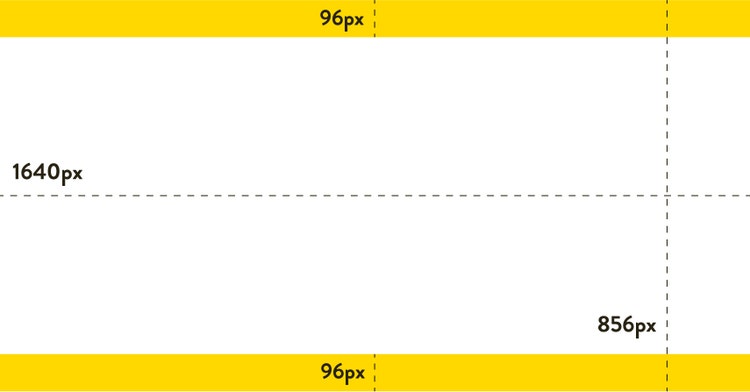
  • The ideal image size for a Facebook group cover photo is 1640px by 856px (a 1.91:1 ratio).
Edit this Template
  • The ideal image size for link shares is 1200px by 630px (or, as close to a 1.91:1 ratio as possible).
  • Make sure your file size is no larger than 8 MB.
  • Images smaller than 600px by 315px will display, although they will appear much smaller in the post. Aim for the recommended size above.
  • Images will appear the same on desktop and mobile.
  • Facebook crawler only accepts gzip and deflate encodings, so make sure your server uses the proper encoding.
  • Metadata is a key component of image link sharing, so be sure to ask your developer to review Facebook’s official guide and make sure you’re optimizing your posts.

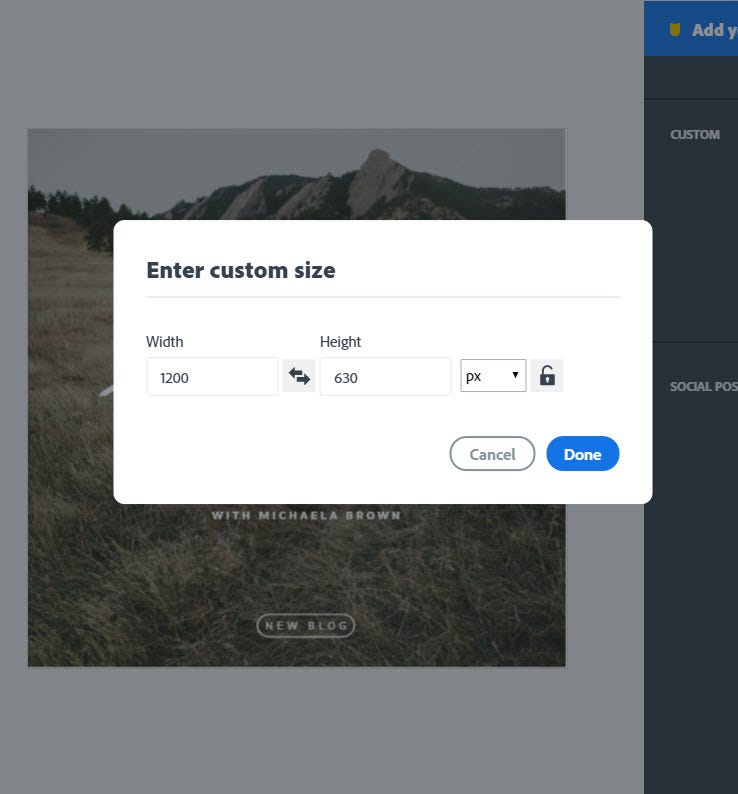
If this sounds like a lot of information to unpack, don’t worry, Adobe Express has your back. Create your link share image by opening up Adobe Express, choosing a 1200px by 630px canvas size, and adding any images or text you have to share.

Custom Size

Facebook ads image guidelines.

Facebook has a complete guide for images used with Facebook Ads. You can read more about it on their site, or see our breakdown here:

General recommendations are as follows:

  • The ideal image ratio is 1.91:1 to 4:5.
  • Choose the highest resolution possible. Accepted formats are JPG or PNG files.
  • Keep any text limited to 125 characters. Images that feature more than 20% text in the composition will experience reduced delivery. Keep your ad images focused on the image content, and save your text for the caption.

For ads with links:

  • The ideal image ratio is 1.91:1 to 1:1.
  • The recommended resolution is at least 1080px by 1080px. Images smaller than 600px by 600px will appear smaller on screen in comparison.
  • Keep your headline text to 25 characters and your link description to 30 characters.

Panoramas or 360 photos:

  • These types of images will appear as an interactive experience for your audience. Facebook recognizes panoramic images by referencing metadata in the photo itself and then display it in a 360-degree viewer on the site.
  • The ideal image size should be less than 30,000px in any dimension and less than 135,000,000px in total size.
  • Files can be as big as 45 MB for JPEG formats or 60 MB for PNGs. JPEGS are recommended and ideally formatted to be between 20-30 MB.
Green and White Antiques Black History Month Facebook Ad
Edit this template
Black & White Football Facebook Ad
Edit this template
Red Holi Facebook Ad
Edit this template
Blue Fresh Cleaning Services Facebook Ad
Edit this template

Trouble uploading Facebook photos? Try these tips:

  • Double-check that your photo is the recommended size.
  • Do you use ad-blocking software? Try turning it off or make sure that Facebook is included as an exception.
  • Make sure you are using the latest version of your web browser.
  • Check your Support Inbox. Facebook will send you warnings for posting abusive content, which could interfere with you uploading additional content in the future.
  • These are some of the most frequent issues. Browse through Facebook’s help page to find details about what other issues can arise in the process.

You might also like...