


Social Media
Channel banners and cover photos: What belongs inside the safe area

Adobe Express
11/05/2026
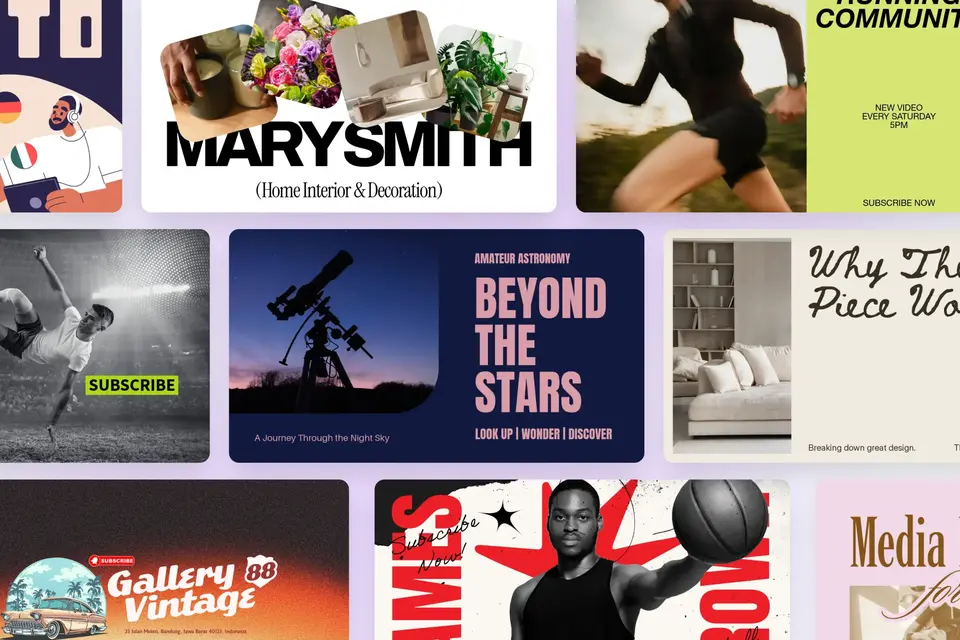
Your name, main message, and essential visual go inside the main area so they survive cropping and interface overlays. Let backgrounds and decorative details extend beyond it. That protected area is your safe zone: It holds what readers need to understand the image, not everything that can fit on the canvas.
Key takeaways
- YouTube’s banner guidance limits files to 6 MB and advises against added shadows, borders, and frames.
- LinkedIn’s personal-profile cover requirements specify JPG or PNG and a file smaller than 8 MB.
- X’s header-cropping guidance warns that 60 pixels at the top and bottom could be cropped on different displays.
What are the YouTube channel banner dimensions and safe area?
YouTube recommends a 2560 × 1440 px banner and publishes a 1235 × 338 px text-and-logo safe area at its minimum 2048 × 1152 px upload size. Keep the measurements paired: The smaller rectangle belongs to the smaller canvas. The same banner appears differently across computer, mobile, and TV displays.
Imagine a baking channel with a name, a short promise, a photograph of bread, and a kitchen background. The name and promise identify the channel. The bread reinforces the subject. The kitchen adds context, but viewers don’t need to see every cupboard to understand the message.
| Design decision | What belongs in the protected area | What can extend beyond it |
|---|---|---|
| Establish the channel’s identity | Keep the channel name or recognizable logo together with any essential description. A crop shouldn’t separate the name from the explanation. | Extend brand patterns, background color, and decorative shapes across the canvas. They reinforce the identity without carrying information viewers must read. |
| Preserve the meaning of the image | Keep enough of the bread visible to make the subject recognizable. An attractive patch of texture may not communicate what the channel teaches. | Let kitchen scenery and supporting imagery crop. Choose a photograph with room around the subject so you can reposition it without losing important details. |
| Make the crop look intentional | Leave breathing room around essential wording and recognizable shapes. Avoid placing letters or important details directly against the crop boundary. | Use continuous texture or photography rather than a decorative frame that depends on every edge remaining visible. |
The banner design tips explain the wider distinction between core, supporting, and decorative content.
Why are there two different YouTube banner safe zone numbers?
The figures relate to different canvas sizes, but the larger design-guide number isn’t an exact enlargement of YouTube’s minimum-size rectangle. Adobe’s banner article uses 1546 × 423 px on the recommended canvas. Distinguish the published platform measurement from the calculation and the design guide.
| Measurement | Canvas size | How to interpret it |
|---|---|---|
| 1235 × 338 px | 2048 × 1152 px | YouTube’s safe area guidelines are based on the minimum upload size. |
| 1543.75 × 422.5 px | 2560 × 1440 px | Calculated by multiplying each published safe-area dimension by 1.25, the scale factor between the canvases. |
| 1546 × 423 px | 2560 × 1440 px | The rectangle used in Adobe’s YouTube banner guide, linked in the specifications table. It isn’t the exact result of that calculation. |
The calculation rounds to approximately 1544 × 423 px. It explains scale, not another specification issued by YouTube. Leave room inside the guide and inspect the upload preview.
What size should a Facebook cover photo and a LinkedIn background photo be?
Facebook’s Page-cover guidance lists a minimum of 400 × 150 px and recommends an sRGB JPG at 851 × 315 px, under 100 kilobytes, for fastest loading. LinkedIn recommends 1584 × 396 px for a personal-profile cover. Keep minimum dimensions, loading recommendations, and display behavior separate.
Facebook describes left-aligned, full-bleed display at 16:9 on computers and 2.4:1 on mobile. Its fastest-loading recommendation isn’t a guaranteed display size or a maximum upload-file limit. PNG may give better results for logos or text. LinkedIn notes that browser-window size and screen resolution can affect appearance.
| Surface or presentation | What can interfere with the design | What to protect |
|---|---|---|
| A square image displayed as a circle | The crop removes corners that were visible in the source file. | Keep the face or logo inside the circle with breathing room. Use a compact variation rather than shrinking a long wordmark until it becomes unreadable. |
| A cover behind a profile picture | The profile picture obscures part of the cover. Facebook describes approximately 40 pixels of overlap on mobile. | Move essential wording away from the overlap and inspect the complete profile. The overlap measurement isn’t a universal safe-zone margin. |
| A Story, Reel, or other vertical video | Captions, account information, and controls can cover the image. | Check with the intended interface visible. Move important details around actual overlays instead of treating the clean export as proof that everything remains readable. |
| A feed or profile-grid preview | The preview can crop differently from the opened post. | Keep enough of the subject visible to identify it in both views. Shorten or reposition text rather than assuming viewers will open the image to understand it. |
The logo-size guide covers choosing suitable dimensions and variations. These social media photography tips explain focal points and negative space.
Which three canvas sizes cover most platforms?
Use square, vertical 1080 × 1920 px, and placement-specific wide layouts as working starting points. This is a production recommendation, not a universal set of upload requirements. Build the square first, then adapt the relationship between the message and image.
| Working canvas | What to establish first | What to reconsider in the next version |
|---|---|---|
| Square | Give the message and subject a clear reading order without relying on the corners. Keep text and images editable. | Inspect the destination’s preview. Reposition or simplify elements instead of shrinking the entire composition to preserve every detail. |
| Vertical, 1080 × 1920 px at 9:16 | Use the height to organize the subject and short message, leaving room for the intended interface. | Check captions, buttons, and stickers. Move an image below a headline when necessary rather than stretching a wider arrangement. |
| Wide, sized for the destination | Group essential information inside the placement’s dependable viewing area. Let background material occupy the extra width. | Check side cropping, profile-picture overlap, and phone readability. Match the destination’s ratio rather than assigning all banners identical proportions. |
The beginner’s guide to social media graphics covers hierarchy and readability across formats.
Adobe Express’s Resize page feature, available on Premium plans, offers presets and custom dimensions. Select Duplicate & Resize to preserve the original while creating another version. Then adjust the composition; changing page dimensions doesn’t finish the design.
How current are these social media image size specs?
The table combines source checks from October 13–October 16, 2026. Working-canvas recommendations, advertising safe zones, and API-upload requirements are labeled separately. TikTok’s in-app cover dimensions, and numerical organic safe-zone margins remain unconfirmed. Each row identifies the scope of its evidence and any unresolved limitations.
| Platform or surface | Specifications and official source | Design application | Verification status |
|---|---|---|---|
| YouTube channel banner | YouTube Help, linked in the takeaways: minimum 2048 × 1152 px at 16:9; recommended 2560 × 1440 px; safe area at minimum size 1235 × 338 px; file limit 6 MB. | Protect the channel identity. The YouTube banner design guide covers composition. | Verified October 13, 2026. |
| YouTube video thumbnai | YouTube’s custom-thumbnail guidance recommends 3840 × 2160 px at 16:9. Upload limits: 50 MB on desktop; 2 MB for video thumbnails on mobile. | Keep the subject readable at preview size. Don’t apply the channel-banner safe area to a thumbnail. | Verified October 13, 2026. |
| YouTube Shorts thumbnail | The same YouTube Help page recommends 2160 × 3840 px at 9:16. Custom Shorts thumbnails require a verified account and can be added through YouTube Studio on a computer. | Inspect the thumbnail where viewers encounter it, not only in the editor. | Verified October 13, 2026. |
| LinkedIn personal-profile cover | LinkedIn Help, linked in the takeaways: recommended 1584 × 396 px; JPG or PNG; smaller than 8 MB. | Check the profile-picture overlap. These LinkedIn background photo ideas address image selection. | Verified October 13, 2026. |
| Facebook Page cover | Facebook Help, linked above: minimum 400 × 150 px. Fastest-loading recommendation: sRGB JPG, 851 × 315 px, under 100 kilobytes. Display ratios: 16:9 on computers; 2.4:1 on mobile. PNG may suit logos or text. | Check both displays and the profile-picture overlap. These Facebook cover photo ideas provide creative direction. | Verified October 13, 2026. |
| Instagram photo posts | Instagram’s photo-resolution guidance says photos 320–1080 px wide retain their original resolution at ratios from 1.91:1 to 3:4. At 1080 px wide, heights span 566–1440 px. Narrower photos enlarge to 320 px; wider photos reduce to 1080 px. Unsupported ratios are cropped. | Choose a supported ratio before positioning text. These rules don’t establish a safe area or profile-grid crop. | Verified October 13, 2026. |
| Instagram Reel videos | Instagram’s Reel-size guidance permits ratios from 1.91:1 to 9:16 and specifies a minimum 30 FPS and minimum resolution of “720 pixels.” It does not identify a complete width-by-height frame size. | Check interface overlays. Don’t turn “720 pixels” into an unstated width-by-height requirement. | Verified October 13, 2026. |
| Instagram Reel cover images | The same Reel-size page recommends 420 × 654 px, described as a 1:1.55 ratio. This recommendation applies to the cover, not the video. | Inspect the cover before posting. Its dimensions don’t define a protected area or guarantee an unchanged grid preview. | Verified October 13, 2026. |
| Instagram Stories, organic | Adobe’s Instagram Story size recommendation is 1080 × 1920 px at 9:16, a working-canvas recommendation rather than a Meta upload requirement. For Stories created from a Page, Meta’s technical-specifications guide lists JPG or PNG images up to 30 MB and MP4 or MOV videos up to 4 GB. For both, it lists aspect ratios as “9:16 and 4:5 to 1.91:1.” | Inspect the intended Story with its interface visible. Keep essential text and imagery clear of controls. The organic sources reviewed don’t specify numerical safe-zone margins; don’t substitute advertising margins. | Adobe’s canvas recommendation confirmed October 16, 2026. Meta’s specifications reviewed the same day; additional checks of official documentation couldn’t confirm whether those specifications remain current for organic Stories. |
| Facebook and Instagram ads | Meta’s ad safe-zone guidance says to keep key elements away from all edges in 9:16 Stories, Reels, Feed, and Facebook in-stream reels ads. For non-9:16 Instagram Feed ads, protect the bottom and side edges. Reels ads that include disclaimers should leave the bottom 40% free of text, logos, and other key creative elements. | Use Safe zone guardrail in Meta Ads Manager to inspect the ad’s safe area, where available. Keep critical content comfortably inside it. The 40% instruction applies specifically to Reels ads with disclaimers, not all Stories or Reels. | Verified October 16, 2026, for Facebook and Instagram ads. |
| TikTok organic video covers selected in the app | TikTok’s cover-selection guidance explains choosing a frame before posting: tap Select cover, select the frame, and tap Save. The page doesn’t specify numerical cover dimensions or safe-zone margins. | Check the selected cover and playing video separately. Keep the subject recognizable in profile and search previews. The TikTok thumbnail design article provides creative context. | Workflow confirmed October 13, 2026. Numerical in-app cover dimensions and safe-zone margins couldn’t be confirmed after additional checks of official documentation. |
| TikTok videos uploaded through the Content Posting API | TikTok’s Media Transfer Guide specifies 360–4096 px for both width and height, MP4, WebM, or MOV files, frame rates of 23–60 FPS, and files up to 4 GB. MP4 is recommended. These requirements apply to uploads through TikTok’s software publishing connection. | Check the requirements of the publishing method you use. These are API video-upload limits, not recommended cover dimensions or protected-area measurements. Inspect the displayed result separately. | Verified October 16, 2026, for Content Posting API uploads. |
| X header image | X’s profile-customization guidance recommends 1500 × 500 px. Its cropping guidance is linked in the takeaways. | Keep essential details away from vulnerable edges and inspect the header alongside the profile picture. | Verified October 13, 2026. |
How do you check a platform’s image sizes yourself?
Read the official guidance for the exact placement, then inspect the exported design on a phone and desktop. Use YouTube Help, LinkedIn Help, X Help, Meta’s help centers, or TikTok Support as appropriate. A platform name alone doesn’t distinguish a cover, organic post, or ad.
| Check | What to establish | What would require another review |
|---|---|---|
| Placement | Match the source to the asset: banner, profile picture, video thumbnail, organic post, or advertisement. | The page describes another placement or never states the specification you need. A readable source can still leave a question unanswered. |
| Meaning of the number | Separate minimum dimensions, recommended resolution, file limits, and safe-area measurements. Record the source and check date. | A copied figure lacks its qualifier or relates to a different canvas. Don’t convert a recommendation into a requirement. |
| Actual display | Upload or preview the design, then read the headline and inspect the subject on a phone with controls visible. Compare desktop too. | Essential content is covered, cropped, or unreadable. Revise the editable original rather than repeatedly resizing a flattened export. |
Create a banner with room for your message
Start with a YouTube banner template in Adobe Express to use an editable layout rather than build from a blank canvas. Replace the sample content with your name, message, and main image. Save the editable version, then check the exported banner in its intended placement on a phone and desktop before publishing.


